Part IV
Configure Your Agent with Goose Recipes
You've mapped out a roadmap. You know what each of your agents needs to look like: their inputs, outputs, and MCP servers. Now it's time to get your hands dirty and actually put an agent to work. It's time to configure a Goose Recipe that serves as the "instructions" for each of your agents.
In an ideal world, this part would be simple. It may well be that a year from now, you can skip this entire section by just copy/pasting everything you've worked on through Part 3, and tell Goose to "create a Recipe for this agent concept".
The reality in mid-2025 is a bit more complicated. LLMs aren't perfect, and agent frameworks haven't fully figured out the best tactics and implementation details to optimize for. So here's what we've learned about the principles and ideas you should keep in mind as you bring your Goose agents to life.
In this part, we'll cover:
- Getting started with Goose
- Building your first happy path
- Solving common challenges with scratchpads and feedback loops
- Scaling with subagents
- Organizing everything with recipes and sub-recipes
What We're Building Towards
Here are the four recipes (and associated sub-recipes) we have ultimately deployed in our Weekly Pulse newsletter process:
Sourcer
sourcer_github.yaml
name: sourcer_github
recipe:
  version: 1.0.0
  title: Newsletter - Sourcer (GitHub)
  description: Pull down the last week of updated GitHub Issues, Pull Requests, and Discussions from the modelcontextprotocol repositories into markdown files, complete with metadata and summaries.
  settings:
    goose_provider: "anthropic"
    goose_model: "claude-sonnet-4-20250514"
  instructions: |
    You are my assistant with an end-goal to save a bunch of augmented data from GitHub Discussions, Pull Requests, and Issues.

    We track our work here in a file called ./scratchpad.txt. We meticulously plan out our steps to make sure this is a COMPREHENSIVE review in a file called ./scratchpad.txt.

    This is a big file with all the line items you need to complete in the form of "- [ ]" checkboxes, which you then mark them off "- [ X ]" as you complete each line item.

    If it doesn't already exist, create it. Note that if it _does_ exist, that means we are not starting from scratch (do not overwrite it).

    All your markdown files (one per issue, pull request, or discussion) should be saved in the ./data-dump directory.

    If your subagents have completed, make sure they have actually completed all the work for them in ./scratchpad.txt. And verify they have done what they said by taking a look at the resulting files in data-dump. You may need to kick off more subagents to work to completion. Address any potential issues you see before handing back control to your caller.
  prompt: |
    These are the "data sources" of interest to us:
    - The `modelcontextprotocol/modelcontextprotocol` Repository's:
      - Discussions
      - Issues
      - Pull Requests
    - The `modelcontextprotocol/registry` Repository's:
      - Discussions
      - Issues
      - Pull Requests
    - The `modelcontextprotocol/inspector` Repository's Pull Requests

    Example of a "data_source" is e.g. "modelcontextprotocol/registry Issues".

    First, I want you to start a subagent to work on each of the data sources. Do not work on the next steps directly; pass along the prompt to a subagent using the sourcer_github_subrecipe_datasource sub-recipe.

    Do NOT hand back control to me until this is complete. If you find 150 issues, 300 pull requests, etc - you should have saved 450 files in ./data-dump before you get back to me.

    Execute on this now.
  extensions:
    # Filesystem Operations
  - type: builtin
    name: developer
    display_name: Developer
    timeout: 300
    bundled: true
    # GitHub PRs
  sub_recipes:
    - name: sourcer_github_subrecipe_datasource
      description: |
        This sub-recipe is responsible for processing a specific data source from GitHub; i.e. a specific repository's Issues OR Pull Requests OR Discussions.
      path: /Users/admin/.config/goose/recipes/sourcer_github_1_subrecipe_datasource.yaml
      sequential_when_repeated: true
isGlobal: true
lastModified: 2025-07-18T14:43:51.546Z
isArchived: false
sourcer_github_1_subrecipe_datasource.yaml
name: sourcer_github_subrecipe_datasource
recipe:
  version: 1.0.0
  title: Newsletter - Sourcer (GitHub) Sub-recipe - Datasource
  description: Pull down a specific repository's Issues, Pull Requests, or Discussions, complete with metadata and summaries in markdown format.
  settings:
    goose_provider: "anthropic"
    goose_model: "claude-sonnet-4-20250514"
  parameters:
    - key: data_source
      input_type: string
      requirement: required
      description: |
        The specific data source to process, e.g. "modelcontextprotocol/registry Issues".
  instructions: |
    You are my assistant with an end-goal to fetch and save to filesystem all the activity that happened from the {{ data_source }} on GitHub.

    We are managing a file called ./scratchpad.txt where you should track your progress. Do NOT overwrite this file; mark your progress in your corresponding section.

    This is a big file with all the line items you need to complete in the form of "- [ ]" checkboxes, which you then mark them off "- [ X ]" as you complete each line item.

    All your markdown files (one per issue, pull request, or discussion) should be saved in the ./data-dump directory.

    If your subagents have completed, make sure they have actually completed all the work for them in ./scratchpad.txt. And verify they have done what they said by taking a look at the resulting files in ./data-dump. You may need to kick off more subagents to work to completion. Address any potential issues you see before handing back control to your caller.
  prompt: |
    Your task:
    1) Identify top level threads (discussions/issues/pull requests) that have been updated (i.e. either newly created, or have at least one new comment) in the last 9 days (9 instead of 7 so we get things at the edges)
    2) Read and update ./scratchpad.txt with a "sub-checkbox" in the appropriate section (corresponding to {{ data_source }}) with a line item for each of your findings

    Some notes on tools to use:
    - When listing GitHub Pull Request, you can use the search_pull_requests tool to properly filter on time-based filters like "updated:>2025-01-01"; do NOT try to use `list_pull_requests` (which lacks such filtering).

    Next, I want you to start a set of subagents - 10 of them at once - to work on each of the targets. Do not work on the next steps directly; pass along the prompt to a subagent using the sourcer_github_subrecipe_save sub-recipe.

    Do NOT hand back control to me until this is complete. If you find e.g. 150 issues, you should be saving 150 new files in ./data-dump.

    Execute on this now.
  extensions:
    # Filesystem Operations
  - type: builtin
    name: developer
    display_name: Developer
    timeout: 300
    bundled: true
    # GitHub PRs
  - bundled: null
    description: ''
    enabled: true
    env_keys: []
    envs: {}
    headers:
      Authorization: Bearer <run gh auth token>
    name: GitHub Remote Pull Requests
    timeout: 300
    type: streamable_http
    uri: https://api.githubcopilot.com/mcp/x/pull_requests/readonly
    # GitHub Issues
  - bundled: null
    description: ''
    enabled: true
    env_keys: []
    envs: {}
    headers:
      Authorization: Bearer <run gh auth token>
    name: GitHub Remote Issues
    timeout: 300
    type: streamable_http
    uri: https://api.githubcopilot.com/mcp/x/issues/readonly
    # GitHub Discussions
  - bundled: null
    description: ''
    enabled: true
    env_keys: []
    envs: {}
    headers:
      Authorization: Bearer <run gh auth token>
    name: GitHub Remote Discussions
    timeout: 300
    type: streamable_http
    uri: https://api.githubcopilot.com/mcp/x/discussions/readonly
  sub_recipes:
    - name: sourcer_github_subrecipe_save
      description: |
        This sub-recipe is responsible for processing a specific issue/PR/discussion from GitHub in a markdown file with metadata.
      path: /Users/admin/.config/goose/recipes/sourcer_github_2_subrecipe_save.yaml
      sequential_when_repeated: false
isGlobal: true
lastModified: 2025-07-18T14:43:51.546Z
isArchived: false
sourcer_github_2_subrecipe_save.yaml
name: sourcer_github_subrecipe_save
recipe:
  version: 1.0.0
  title: Newsletter - Sourcer (GitHub) Sub-recipe - Save
  description: Pull down a specific GitHub Issue, Pull Request, or Discussion, complete with metadata and summaries, and save it to a markdown file.
  settings:
    goose_provider: "anthropic"
    goose_model: "claude-sonnet-4-20250514"
  parameters:
    - key: target_page
      input_type: string
      requirement: required
      description: |
        The specific target page to process, e.g. "modelcontextprotocol/registry Issue #948".
  instructions: |
    You are my assistant with an end-goal to fetch and save to filesystem a file corresponding to the activity that happened on {{ target_page }} on GitHub.

    We are managing a file called ./scratchpad.txt where you should track your progress. Do NOT overwrite this file; mark your progress in your corresponding section.

    This is a big file with all the line items you need to complete in the form of "- [ ]" checkboxes, which you then mark them off "- [ X ]" as you complete each line item.

    In ./scratchpad.txt, if any given item has ALL of a), b), c), d), e) marked off, please delete those subitems (but leave the parent item present and marked).

    All your markdown files (one per issue, pull request, or discussion) should be saved in the ./data-dump directory.
  prompt: |
    Go and create a "sub-sub-checkbox" in your scratchpad for your assigned item to do the following:
      a) Fetch the target's ENTIRE contents (including the original post and all comments, plus metadata about them)
      b) Analyze it to come up with the following information:
        - List of participants (just their GitHub handles, don't try giving any other context)
        - A pithy one sentence summary of what this discussion is about PLUS a one sentence summary of what happened in it THIS WEEK (skip the second bit if the discussion only started this week)
        - Five bullet points of "key highlights" regarding what happened _this week_ in this discussion. Could be an interesting place to note highly-emoji'd messages or high engagement counts on specific points.
      c) Save it as a markdown file with frontmatter-formatted metadata at the top (page url, title, participants, 1-2 sentence summary, key highlights), then the fetched raw message contents below the frontmatter data. For every message saved, make sure to include message body, timestamp of the message, GitHub handle (if available), relevant code/diff (if in a PR), emoji reactions. There should be one file per effective URL. Make the filename a web slug-formatted name, prefixed by something like `discussion__modelcontextprocotol_modelcontextprotocol__` or `issue__modelcontextprotocol_inspector__` (reflective of where you found it), that describes the main topic at hand. Place this file in ./data-dump/.
      d) REMOVE any messages that were not sent in the last 9 days! We should only retain the first message (original post) and then any messages that were created in the last 9 days. Include a placeholder <-- Older than 9 days --> type of message if we're intentionally leaving a gap in the messages.
      e) Save the file and mark it off on the scratchpad

    Notes:
    - If an issue was mysteriously closed without clear resolution, even if it was marked "completed"; beware it may just have been converted to a Discussion. This is not a significant event; we're just moving where the issue is being considered.

    Do NOT hand back control to me until this is complete. I expect to see a final entry in ./data-dump.

    Execute on this now.

    I am then going to review this file manually; let me know when you're done.
  extensions:
    # Filesystem Operations
  - type: builtin
    name: developer
    display_name: Developer
    timeout: 300
    bundled: true
    # GitHub PRs
  - bundled: null
    description: ''
    enabled: true
    env_keys: []
    envs: {}
    headers:
      Authorization: Bearer <run gh auth token>
    name: GitHub Remote Pull Requests
    timeout: 300
    type: streamable_http
    uri: https://api.githubcopilot.com/mcp/x/pull_requests/readonly
    # GitHub Issues
  - bundled: null
    description: ''
    enabled: true
    env_keys: []
    envs: {}
    headers:
      Authorization: Bearer <run gh auth token>
    name: GitHub Remote Issues
    timeout: 300
    type: streamable_http
    uri: https://api.githubcopilot.com/mcp/x/issues/readonly
    # GitHub Discussions
  - bundled: null
    description: ''
    enabled: true
    env_keys: []
    envs: {}
    headers:
      Authorization: Bearer <run gh auth token>
    name: GitHub Remote Discussions
    timeout: 300
    type: streamable_http
    uri: https://api.githubcopilot.com/mcp/x/discussions/readonly
isGlobal: true
lastModified: 2025-07-18T14:43:51.546Z
isArchived: false
Organizer
organizer.yaml
name: organizer
recipe:
  version: 1.0.0
  title: Newsletter - Organizer
  description: Main organizer recipe that coordinates the organization of newsletter links, running both link organization on human-curated links and leveraging sourcing output in sequence.
  settings:
    goose_provider: "anthropic"
    goose_model: "claude-opus-4-20250514"
  instructions: |
    You are the main organizer agent for our weekly newsletter about MCP. Your job is to coordinate the organization of all collected links and data sources.

    You don't need to do any "work" yourself; delegate that to the subrecipes.

    End Goal:
    - A fully organized set of links in ./output/links-2.md
    - Ready for the next stage of newsletter production

  prompt: |
    You need to run two organization tasks in sequence:

    1. First, run the organizer_links subrecipe to process the manually collected links in ./input/links.md
       - This will create or update ./output/links.md with organized, summarized links

    2. After that completes, run the organizer_github subrecipe to incorporate GitHub data
       - This will create or update ./output/links-2.md, building on the work from step 1

    Monitor the progress of each subrecipe and ensure they complete successfully before moving to the next step.

  extensions:
    # Filesystem Operations
  - type: builtin
    name: developer
    display_name: Developer
    timeout: 300
    bundled: true
  sub_recipes:
    - name: organizer_links
      description: |
        Organizes manually collected links into a structured format with summaries
      path: /Users/admin/.config/goose/recipes/organizer_links.yaml
      sequential_when_repeated: true
    - name: organizer_github
      description: |
        Incorporates GitHub data sources into the organized links
      path: /Users/admin/.config/goose/recipes/organizer_github.yaml
      sequential_when_repeated: true
isGlobal: true
lastModified: 2025-07-27T00:00:00.000Z
isArchived: false
organizer_github.yaml
name: organizer_github
recipe:
  version: 1.0.0
  title: Newsletter - Organizer (GitHub)
  description: Collate the collection of GitHub data into a set of deduplicated, categorized links complete with easy to skim summaries.
  settings:
    goose_provider: "anthropic"
    goose_model: "claude-sonnet-4-20250514"
  instructions: |
    You are my assistant where our end-goal is to augment and organize the next edition of our weekly newsletter about MCP in a bullet point outline of things we might write about.

    Context:
    - Our current state of work is in ./output/links.md
    - All your output will be in ./output/links-2.md
    - We have a bunch of files in /Users/admin/github-projects/agents/newsletter-goose/1_sourcer/github/data-dump - each file is a _potential_ candidate for inclusion in the output
    - There is a collection of news items in this file that we intend to write about
    - They are categorized by section we plan put them in the weekly newsletter

    End Goal:
    - New (or updated, if it already exists) file at ./output/links-2.md
    - Every link should have a sub-bullet point with one sentence summarizing what it is / why it is newsworthy
    - Every naked news item should have some new canonical link associated with it (and the description of the news item moved into being asub-bullet point). These kinds of naked news items should have two sub-bullet points: the original text of the news item and the newsummary of the new link
    - Similar news should be placed adjacent to each other
    - If adjacent news items are very much about the same theme, they can be grouped into a theme described by a bullet point

    We meticulously plan out our steps to make sure this is a COMPREHENSIVE process in a file called ./scratchpad-gh.txt. This is a big file with all the line items you need to complete in the form of "- [ ]" checkboxes, which you then mark them off "- [ X ]" as you complete each line item. If it doesn't already exist, create it. Note that if it _does_ exist, that means we are not starting from scratch (do not overwrite it).

    Make sure your subagents complete all the tasks in ./scratchpad-gh.txt to completion. If they don't finish, start another subagent fleet until it is finished 100%. Do not hand back control to the user until all the tasks are marked complete.

    Notes:
    - Do NOT DELETE ANY TEXT! It is your job to augment and reorganize, but you should not remove or rewrite things that were already there. Retaining original context is important.


  prompt: |
    Make sure there is a checkbox for each of the line items we intend to review as you get started.

    First step is to initialize ./output/links-2.md if it doesn't already exist. If it doesn't exist, make a copy of links.md to be the fresh links-2.md

    Start by identifying each file in `/Users/admin/github-projects/agents/newsletter-goose/1_sourcer/github/data-dump`. You're going to want to assign 5 of these files to EACH subagent you spin up in the next step.

    Do NOT guess file names. Before you add new checkboxes, verify the specific file _actually_ exists in the data-dump directory. When you are done, ensure that you've got them all by ensuring the count of checkboxes matches the number of files in the data-dump directory.

    I want you to start a subagent fleet - 3 at once - to work on each of the target files. Do not work on the next steps directly; pass along the prompt to a subagent using the organizer_github_subrecipe_markdown_file sub-recipe.

    Each subagent should only work on 5 entries, in sequence (within itself), at a time to avoid hitting rate limits. It should report back to you when it's done, then you proceed to creating another set of 3 subagents.
  extensions:
    - type: builtin
      name: developer
      display_name: Developer
      timeout: 300
      bundled: true
  sub_recipes:
    - name: sourcer_github_subrecipe_datasource
      description: |
        This sub-recipe is responsible for processing a specific data source from GitHub; i.e. a specific repository's Issues OR Pull Requests OR Discussions.
      path: /Users/admin/.config/goose/recipes/organizer_github_subrecipe_markdown_file.yaml
      sequential_when_repeated: false
isGlobal: true
lastModified: 2025-07-18T14:43:51.546Z
isArchived: false
organizer_github_subrecipe_markdown_file.yaml
name: organizer_github_subrecipe_markdown_file
recipe:
  version: 1.0.0
  title: Newsletter - Organizer (GitHub) Subrecipe - Markdown File
  description: Process a markdown file into a set of deduplicated, categorized links complete with easy to skim summary.
  settings:
    goose_provider: "anthropic"
    goose_model: "claude-sonnet-4-20250514"
  parameters:
    - key: files_to_process
      input_type: string
      requirement: required
      description: |
        The specific files in /Users/admin/github-projects/agents/newsletter-goose/1_sourcer/github/data-dump that this subagent should process.
    - key: checkboxes_to_complete
      input_type: string
      requirement: required
      description: |
        The specific checkboxes in ./scratchpad.txt that this subagent should complete.
  instructions: |
    You are a subagent of a main agent our end-goal is to augment and organize the next edition of our weekly newsletter about MCP in a bullet point outline of things we might write about.

    Context:
    - Our current state of work is in ./output/links-2.md
    - All your output will be updating ./output/links-2.md
    - We are tracking our work in ./scratchpad-gh.txt
    - The files you as the subagent specifically are processing: {{ files_to_process }}

    From ./scratchpad-gh.txt, your job is to work through the following checkboxes:
    {{ checkboxes_to_complete }}

    Your Job per link:
    1) Decide whether it is newsworthy this week. Use objective filters for this. For GitHub, that means:
    - If it's a new Discussion/Issue/Pull Request, it needs to have at least 2 comments on it or a bunch of reactions
    - If it's an existing Discussion/Issue/Pull Request, it needs to have had at least one round of meaningful replies/discussion since the prior week
    2) If yes, incorporate it into ./output/links-2.md. Otherwise skip it.

    When incorporating into ./output/links-2.md, include a bullet point explaining why you included it. Lots of reactions? What's the nature of the new news on an old discussion? Make it clear to me why I should be interested in this and it's not just unnewsworthy noise.

    When choosing not to include it, in ./scratchpad-gh.txt add in brackets [] at the end of the line with a very brief explanation for why you chose to ignore this one.

    End Goal:
    - Updated file at ./output/links-2.md
    - If a link you are processing is an exact duplicate URL of something already in there, skip it
    - If a link you are processing is very similar to something already in there, place it adjacent to it or as a subbullet within it, as appropriate
    - Every new link we introduce should have a sub-bullet point with one sentence summarizing what it is / why it is newsworthy
    - If adjacent news items are very much about the same theme, they can be grouped into a theme described by a bullet point

    We meticulously plan out our steps to make sure this is a COMPREHENSIVE process in a file called ./scratchpad-gh.txt. This is a big file with all the line items you need to complete in the form of "- [ ]" checkboxes, which you then mark them off "- [ X ]" as you complete each line item. If it doesn't already exist, create it. Note that if it _does_ exist, that means we are not starting from scratch (do not overwrite it).

    When you are done with each of your files, mark them off in ./scratchpad-gh.txt. If this action completes all the subcheckboxes of a parent checkbox, delete all the subcheckboxes (do NOT delete more than one level of subcheckboxes).

    Notes:
    - IMPORTANT: You do NOT need to read the entirety of every file!!! Every file has a frontmatter summary at the top. So do not try to read every file; just read the first 50 lines of every file as you process it.
    - Do all your output work in ./output/links-2.md and ./scratchpad-gh.txt; do not modify any other files
    - Do NOT DELETE ANY TEXT! It is your job to augment and reorganize, but you should not remove or rewrite things that were already there. Retaining original context is important.
  prompt: |
    Start working through the assigned checkboxes.

  extensions:
    # Filesystem Operations
    - type: builtin
      name: developer
      display_name: Developer
      timeout: 300
      bundled: true
isGlobal: true
lastModified: 2025-07-18T14:43:51.546Z
isArchived: false
organizer_links.yaml
name: organizer_links
recipe:
  version: 1.0.0
  title: Newsletter - Organizer (Links)
  description: Organize a collection of links into a set of deduplicated, categorized links complete with easy to skim summaries.
  settings:
    goose_provider: "anthropic"
    goose_model: "claude-opus-4-20250514"
  instructions: |
    You are a subagent of a main agent where our end-goal is to augment and organize the next edition of our weekly newsletter about MCP in a bullet point outline of things we might write about.

    Context:
    - There are a bunch of links and news items in this file that we have collected throughout the week
    - They are categorized by section we will put them in the weekly newsletter
    - They are not thoughtfully organized, just haphazardly jotted down during the course of the week
    - Sometimes there is a link to an implied news item
    - Other times there is just a note about some news item that happened, with no supporting link

    End Goal:
    - New (or updated, if it already exists) file at ./output/links.md
    - Every link should have a sub-bullet point with one sentence summarizing what it is / why it is newsworthy
    - Every naked news item should have some new canonical link associated with it (and the description of the news item moved into being asub-bullet point). These kinds of naked news items should have two sub-bullet points: the original text of the news item and the newsummary of the new link
    - Similar news should be placed adjacent to each other
    - If adjacent news items are very much about the same theme, they can be grouped into a theme described by a bullet point

    We meticulously plan out our steps to make sure this is a COMPREHENSIVE process in a file called ./scratchpad.txt. This is a big file with all the line items you need to complete in the form of "- [ ]" checkboxes, which you then mark them off "- [ X ]" as you complete each line item. If it doesn't already exist, create it. Note that if it _does_ exist, that means we are not starting from scratch (do not overwrite it).

    Start by identifying each entry already in the doc. In general, this will be a top level bullet point (in some cases we might already have some additional context in the sub-bullet points; don't break them apart!).

    Make sure your subagents complete all the tasks in ./scratchpad.txt to completion. If they don't finish, start another subagent fleet until it is finished 100%. Do not hand back control to the user until all the tasks are marked complete.

    Notes:
    - Do NOT DELETE ANY TEXT! It is your job to augment and reorganize, but you should not remove or rewrite things that were already there. Retaining original context is important.

  prompt: |
    Our manual dump of link candidates is in ./input/links.md

    Make sure there is a checkbox for each of the line items we intend to review.

    I want you to start a subagent fleet - 3 at once - to work on each of the data sources. Do not work on the next steps directly; pass along the prompt to a subagent using the organizer_links_subrecipe_news_item sub-recipe.

    Each subagent should only work on ONE entry at a time. It should report back to you when it's done, then you proceed to creating another set of 3 subagents. Do not stop creating subagents until all the entries in ./scratchpad.txt are marked entirely complete.

  extensions:
    # Filesystem Operations
  - type: builtin
    name: developer
    display_name: Developer
    timeout: 300
    bundled: true
  sub_recipes:
    - name: sourcer_github_subrecipe_datasource
      description: |
        This sub-recipe is responsible for processing a specific data source from GitHub; i.e. a specific repository's Issues OR Pull Requests OR Discussions.
      path: /Users/admin/.config/goose/recipes/organizer_links_subrecipe_news_item.yaml
      sequential_when_repeated: false
isGlobal: true
lastModified: 2025-07-18T14:43:51.546Z
isArchived: false
organizer_links_subrecipe_news_item.yaml
name: organizer_links_subrecipe_news_item
recipe:
  version: 1.0.0
  title: Newsletter - Organizer (Links) Subrecipe - News Item
  description: Process a link into a set of deduplicated, categorized links complete with easy to skim summary.
  settings:
    goose_provider: "anthropic"
    goose_model: "claude-sonnet-4-20250514"
  parameters:
    - key: checkboxes_to_complete
      input_type: string
      requirement: required
      description: |
        The specific checkboxes in ./scratchpad.txt that this subagent should complete.
  instructions: |
    You are a subagent of a main agent where our end-goal is to augment and organize the next edition of our weekly newsletter about MCP in a bullet point outline of things we might write about.

    Context:
    - There are a bunch of links and news items in this file that we have collected throughout the week
    - They are categorized by section we will put them in the weekly newsletter
    - They are not thoughtfully organized, just haphazardly jotted down during the course of the week
    - Sometimes there is a link to an implied news item
    - Other times there is just a note about some news item that happened, with no supporting link

    End Goal:
    - New or updated file at ./output/links.md
    - Every link should have a sub-bullet point with one sentence summarizing what it is / why it is newsworthy
    - Every naked news item should have some new canonical link associated with it (and the description of the news item moved into being a sub-bullet point). These kinds of naked news items should have two sub-bullet points: the original text of the news item and the newsummary of the new link
    - Similar news should be placed adjacent to each other
    - If adjacent news items are very much about the same theme, they can be grouped into a theme described by a bullet point

    We meticulously plan out our steps to make sure this is a COMPREHENSIVE process in a file called ./scratchpad.txt. This is a big file with all the line items you need to complete in the form of "- [ ]" checkboxes, which you then mark them off "- [ X ]" as you complete each line item. If it doesn't already exist, create it. Note that if it _does_ exist, that means we are not starting from scratch (do not overwrite it).

    Specifically, your job is to work through the following checkboxes:
    {{ checkboxes_to_complete }}

    When you are done, mark them off in ./scratchpad.txt. If this action completes all the subcheckboxes of a parent checkbox, delete all the subcheckboxes (do NOT delete more than one level of subcheckboxes).

    Notes:
    - Do NOT DELETE ANY TEXT! It is your job to augment and reorganize, but you should not remove or rewrite things that were already there. Retaining original context is important.
    - When using pulsefetch, always do resultHandling as returnOnly

  prompt: |
    Start working through the assigned checkboxes.

  extensions:
    # Filesystem Operations
  - type: builtin
    name: developer
    display_name: Developer
    timeout: 300
    bundled: true
    # Pulse Fetch
  - args:
    - -y
    - '@pulsemcp/pulse-fetch@latest'
    bundled: null
    cmd: npx
    description: Fetch content from a publicly-accessible URL
    enabled: false
    env_keys:
    - FIRECRAWL_API_KEY
    - BRIGHTDATA_API_KEY
    - OPTIMIZE_FOR
    - LLM_PROVIDER
    - LLM_API_KEY
    - MCP_RESOURCE_STORAGE
    envs:
      FIRECRAWL_API_KEY: "<api key>"
      BRIGHTDATA_API_KEY: "<api key>"
      OPTIMIZE_FOR: "speed"
      LLM_PROVIDER: "anthropic"
      LLM_API_KEY: "<api key>"
      MCP_RESOURCE_STORAGE: "memory"
    name: pulsefetch
    timeout: 300
    type: stdio
    # Tavily
  - bundled: null
    description: ''
    enabled: false
    env_keys: []
    envs: {}
    headers: {}
    name: tavily
    timeout: 300
    type: streamable_http
    uri: https://mcp.tavily.com/mcp/?tavilyApiKey=<token>
  sub_recipes:
    - name: sourcer_github_subrecipe_datasource
      description: |
        This sub-recipe is responsible for processing a specific data source from GitHub; i.e. a specific repository's Issues OR Pull Requests OR Discussions.
      path: /Users/admin/.config/goose/recipes/organizer_links_subrecipe_news_item.yaml
      sequential_when_repeated: false
isGlobal: true
lastModified: 2025-07-18T14:43:51.546Z
isArchived: false
Polisher
polisher.yaml
name: polisher
recipe:
  version: 1.0.0
  title: Newsletter - Polisher (Main)
  description: Main polisher recipe that coordinates the review of newsletter drafts, checking for both link issues and typos/formatting errors.
  settings:
    goose_provider: "anthropic"
    goose_model: "claude-opus-4-20250514"
  instructions: |
    You are the main polisher agent for our weekly newsletter about MCP. Your job is to coordinate a comprehensive review of the newsletter draft before publication.

    You don't need to do any "work" yourself; delegate that to the subrecipes.

    End Goal:
    - A report to the user summarizing all issues found in the draft
    - Make sure that BOTH the links and the typos report is available to the user in your message (don't make them hunt for it in files)

  prompt: |
    You need to run two review tasks in sequence:

    1. First, run the polisher_links subrecipe to check all links in the draft

    2. After that completes, run the polisher_typos subrecipe to check for typos and formatting

    3. Once both subrecipes complete, provide a comprehensive summary of all issues uncovered:

    Monitor the progress of each subrecipe and ensure they complete successfully before moving to the next step.

  extensions:
    # Filesystem Operations
  - type: builtin
    name: developer
    display_name: Developer
    timeout: 300
    bundled: true
  sub_recipes:
    - name: polisher_links
      description: |
        Reviews the draft for broken links, mismatched anchor text, and other link-related issues
      path: /Users/admin/github-projects/agents/newsletter-goose/4_polisher/polisher_links.yaml
      sequential_when_repeated: true
    - name: polisher_typos
      description: |
        Reviews the draft for typos, grammatical errors, and formatting inconsistencies
      path: /Users/admin/github-projects/agents/newsletter-goose/4_polisher/polisher_typos.yaml
      sequential_when_repeated: true
isGlobal: true
lastModified: 2025-07-27T00:00:00.000Z
isArchived: false
polisher_links.yaml
name: polisher_typos
recipe:
  version: 1.0.0
  title: Newsletter - Polisher (Links)
  description: Review a draft of the newsletter for typos and similar mistakes.
  settings:
    goose_provider: "anthropic"
    goose_model: "claude-sonnet-4-20250514"
  instructions: |
    You are my assistant helping me to prepare a draft of our newsletter for publication.

    The current draft is available in ./draft.md.

    An example of a final draft is in ./final-draft-example.md. We want our draft.md to be in a very similar state as the final draft.

    Your job is to review our draft very carefully.

    I want you to find any bad links throughout the post.

    Here are examples of what I mean by "bad links":
    - A broken link (404); or basically anything that isn't a 200
    - A link that might have an HTTP status of 200 but then when you look at what it's loading it is broken in some way
    - A link that has anchor text that does not match where it goes (e.g. pasted the wrong link)
      - A common way this manifests is accidental paste of the same link in two places (when it should have been a different link the second time). Generally, it should be quite rare to repeat a link
    - A note or wording that implies there should be a link, but there is not a link present
    - A link that goes to a paywall or auth wall; we want our readers to be able to click and read without needing to use other accounts

    Your job is NOT to comment on the piece overall / from a content perspective, but rather to catch lapses or mistakes in our initial work.

    Do not make changes to the draft directly; just report back a list of issues.

    We meticulously plan out our steps to make sure this is a COMPREHENSIVE process in a file called ./scratchpad.txt. This is a big file with all the line items you need to complete in the form of "- [ ]" checkboxes, which you then mark them off "- [ X ]" as you complete each line item. If it doesn't already exist, create it. Note that if it _does_ exist, that means we are not starting from scratch (do not overwrite it).

    In this case, your to-do list should have one line item per link you need to check. The list of subtasks will be the same per link.

    Make sure your subagents complete all the tasks in ./scratchpad.txt to completion. If they don't finish, start another subagent fleet until it is finished 100%.

  prompt: |
    I want you to start a _PARALLELIZED subagent fleet_ - 5 at once - to work on a set of links (up to 5 per subagent). Do not work on the next steps directly; pass along a prompt to a parallelized subagent.

    Each subagent should report back to you when it's done, then you proceed to creating another set of subagents. Do not stop creating subagents until all the entries in ./scratchpad.txt are marked entirely complete.

  extensions:
    # Filesystem Operations
  - type: builtin
    name: developer
    display_name: Developer
    timeout: 300
    bundled: true
    # Pulse Fetch
  - args:
    - -y
    - '@pulsemcp/pulse-fetch@latest'
    bundled: null
    cmd: npx
    description: Fetch content from a publicly-accessible URL
    enabled: false
    env_keys:
    - FIRECRAWL_API_KEY
    - BRIGHTDATA_API_KEY
    - OPTIMIZE_FOR
    - LLM_PROVIDER
    - LLM_API_KEY
    - MCP_RESOURCE_STORAGE
    envs:
      FIRECRAWL_API_KEY: "<api key>"
      BRIGHTDATA_API_KEY: "<api key>"
      OPTIMIZE_FOR: "cost"
      LLM_PROVIDER: "anthropic"
      LLM_API_KEY: "<api key>"
      MCP_RESOURCE_STORAGE: "memory"
    name: pulsefetch
    timeout: 300
    type: stdio
isGlobal: true
lastModified: 2025-07-18T14:43:51.546Z
isArchived: false
polisher_typos.yaml
name: polisher_typos
recipe:
  version: 1.0.0
  title: Newsletter - Polisher (Typos)
  description: Review a draft of the newsletter for typos and similar mistakes.
  settings:
    goose_provider: "anthropic"
    goose_model: "claude-opus-4-20250514"
  instructions: |
    You are my assistant helping me to prepare a draft of our newsletter for publication.

    The current draft is available in ./draft.md.

    An example of a final draft is in ./final-draft-example.md. We want our draft.md to be in a very similar state as the final draft.

    Your job is to review our draft very carefully.

    I want you to find any unintentional mistakes/typos throughout the text.

    Your job is NOT to comment on the piece overall / from a content perspective, but rather to catch lapses or mistakes in our initial work.

    Do not make changes to the draft directly; just report back a list of issues.

  prompt: |
    Here are examples of the kind of thing you're looking for:
    - Typos
    - Unfinished thoughts
    - Grammatical errors
    - Accidental re-use of the same phrases or unusual words not too far apart from each other (e.g. wouldn't want to say something like "Anyway, they did... [1 sentence later] Anyway, we now...")
    - Hyperlinks that don't match up with the anchor text
      - A common mistake is to assign the same hyperlink in multiple places where we meant to assign two different ones
    - Formatting errors or inconsistencies (refer to final-draft-example.md as the source of truth; we don't need to match it _exactly_ but you should call out any potentially unintentional inconsitencies)
    - Anything else you think we may not want to publish / send as a newsletter

  extensions:
    # Filesystem Operations
  - type: builtin
    name: developer
    display_name: Developer
    timeout: 300
    bundled: true
isGlobal: true
lastModified: 2025-07-18T14:43:51.546Z
isArchived: false
Publisher
publisher.yaml
name: publisher
recipe:
  version: 1.0.0
  title: Newsletter - Publisher (Main)
  description: Main publisher recipe that coordinates the formatting and publication of newsletter drafts, running formatting first then publishing to CMS.
  settings:
    goose_provider: "anthropic"
    goose_model: "claude-opus-4-20250514"
  instructions: |
    You are the main publisher agent for our weekly newsletter about MCP. Your job is to coordinate the formatting and publication of the newsletter draft.

    You don't need to do any "work" yourself; delegate that to the subrecipes.

    End Goal:
    - A properly formatted newsletter with HTML body and table of contents
    - Newsletter published to the CMS in draft status for final review
    - URL to the draft provided to the user

  prompt: |
    You need to run two publishing tasks in sequence:

    1. First, run the publisher_format subrecipe to format the newsletter
       - This will create ./table-of-contents.html and ./body.html from ./draft.md
       - It will also determine the full title for the newsletter edition

    2. After that completes, run the publisher_publish subrecipe to publish to the CMS
       - Pass the full_title from step 1 as a parameter to this subrecipe
       - This will publish the newsletter in draft status to the CMS
       - It will provide you with a URL to the draft

    3. Once both subrecipes complete successfully:
       - Report the URL of the published draft to the user
       - Confirm that the newsletter is ready for final review in the CMS

    Monitor the progress of each subrecipe and ensure they complete successfully before moving to the next step.

  extensions:
    # Filesystem Operations
  - type: builtin
    name: developer
    display_name: Developer
    timeout: 300
    bundled: true
  sub_recipes:
    - name: publisher_format
      description: |
        Formats the newsletter draft into HTML body and table of contents
      path: /Users/admin/github-projects/agents/newsletter-goose/5_publisher/publisher_format.yaml
      sequential_when_repeated: true
    - name: publisher_publish
      description: |
        Publishes the formatted newsletter to the CMS in draft status
      path: /Users/admin/github-projects/agents/newsletter-goose/5_publisher/publisher_publish.yaml
      sequential_when_repeated: true
isGlobal: true
lastModified: 2025-07-27T00:00:00.000Z
isArchived: false
publisher_format.yaml
name: publisher_format
recipe:
  version: 1.0.0
  title: Newsletter - Publisher (Format)
  description: From a monolithic draft, create a body.html and table-of-contents.html for the newsletter.
  settings:
    goose_provider: "anthropic"
    goose_model: "claude-opus-4-20250514"
  instructions: |
    You are my assistant helping me to prepare a draft of our newsletter for publication to our CMS, which requires a specific format.

    Your job is to take the ./draft.md file as input, and output a ./table-of-contents.html, ./body.html file, and a decide on a full title for the piece (just print it in response to the user/caller).
  prompt: |
    Every blog post we publish has an HTML "body" and an HTML "table of contents".

    Here's an EXAMPLE of a table of contents:

    ```
    <p>
        <a href="#mcp-upcoming">What's upcoming for MCP?</a>
    </p>
    <p>
        <a href="#featured-work">Featured MCP Work</a>
    </p>
    <p>
        <a href="#good-links">A Few Good Links</a>
    </p>
    ```

    When creating a table of contents, you should derive it from the provided content in the chat.

    The body needs to make sure it has the appropriate `id` values so the anchor tags work.

    The table of contents should have pretty brief anchor text; it shouldn't be the entire h2/h3 of the body.

    Do NOT set target="_blank" on table of contents links.

    The body itself should have only basic HTML; no styling. No <body> tags (just the inside of it); we're copy/pasting it to be inside another `<div>`.

    Here's an example body:

    ```
    <p>
        The <strong>xAI</strong> team <a href="https://techcrunch.com/2025/07/09/elon-musks-xai-launches-grok-4-alongside-a-300-monthly-subscription/" target="_blank">launched Grok 4 last Wednesday</a>. But public opinion has now had time to digest the model, and we think it's making less of a splash than even <strong>Moonshot AI's</strong> launch of <strong>Kimi K2</strong>: an open-weight model out of China.
    </p>
    <p>
        <strong>Grok 4</strong> looks great on paper. It blows the other frontier models out of the water on <a href="https://x.com/arcprize/status/1943168950763950555" target="_blank">some major benchmarks</a>. Its voice mode has <a href="https://x.com/i/broadcasts/1lDGLzplWnyxm?t=39m24s" target="_blank">less latency than OpenAI's</a>. xAI has spent an <a href="https://x.ai/news/grok-4#scaling-up-reinforcement-learning" target="_blank">absurd amount of money training it</a>.
    </p>
    <p>
        But it's failing to excel on the <strong>reality tests</strong>. While there are some positive reviews of it being a <a href="https://x.com/cline/status/1944462537187356910" target="_blank">strong planner</a>, actual usage by the community is not bearing out, and critiques have started <a href="https://x.com/LiTianleli/status/1945016414361784748" target="_blank">rolling in</a>. LLM aggregator app <strong>Yupp</strong> reports it is <a href="https://x.com/lintool/status/1943721853186404606" target="_blank">middle of the road at best</a>. <a href="https://openrouter.ai/rankings/programming?view=day" target="_blank">Daily usage on <strong>OpenRouter</strong></a> has consistently failed to break the top ten, instead settling for a neck to neck race with Kimi K2 around 15th. <strong>Elon Musk</strong> appears to be out of touch with the realities of software engineering with AI, believing engineers still <a href="https://x.com/elonmusk/status/1943178423947661609" target="_blank">copy/paste code into chat prompts</a> and demeaning <a href="https://x.com/elonmusk/status/1943214861200298412" target="_blank">what engineers actually want optimized for their workflows</a>.
    </p>
    <p>
        While <strong>Kimi K2</strong> is not claiming to be a new frontier model, it <i>is</i> suddenly a leading open source model for coding. Moonshot describes it as <a href="https://x.com/Kimi_Moonshot/status/1943694959057699258" target="_blank">optimized for coding and "<strong>agentic tasks</strong>,"</a> the latter of which we think is an increasingly smart concept for an LLM to prioritize. You can even use it <a href="https://x.com/jeremyphoward/status/1944322841866125597" target="_blank">with Claude Code</a>. The future looks bright for top tier coding LLMs that aren't locked behind an expensive API endpoint: it's only a matter of time until we get a Sonnet-4 quality model with <strong>open weights</strong>.
    </p>
    <p>
        At the application layer, the <strong>AI web browser wars</strong> have started heating up. The <strong>Browser Company</strong> was first to market with <a href="https://www.diabrowser.com/" target="_blank"><strong>Dia</strong></a> a few weeks ago. <strong>Perplexity</strong> launched <a href="https://x.com/TechCrunch/status/1942962456671703484" target="_blank"><strong>Comet</strong></a> this week. <strong>OpenAI</strong> is rumored to be launching their browser <a href="https://techcrunch.com/2025/07/09/openai-is-reportedly-releasing-an-ai-browser-in-the-coming-weeks/" target="_blank">within a few weeks</a>.
    </p>
    <p>
        Some sort of AI-enabled browser UX will likely become the world's default before long. We expect to see these players duke it out with leading incumbent <strong>Chrome</strong>, much like we see Cursor vs. Windsurf (<a href="https://x.com/cognition_labs/status/1944819486538023138" target="_blank">RIP</a>) vs. VS Code in the <strong>IDE wars</strong>.
    </p>
    <p>
        One thing we think Perplexity is getting very wrong: a continued lack of regard for cooperating with <strong>the web ecosystem</strong>. CEO Aravind Srinivas <a href="https://x.com/vitrupo/status/1944256472952844373" target="_blank">puts down MCP</a> and believes the way to AI-ify browsers is to adversarially scrape every website and service, trying to pretend that autonomous agents are the same as human users. That might <i>sort of</i> work while you're a relatively small player like Perplexity. But as soon as you get some traction, website owners will act on these fundamental truths:
    </p>
    <ol>
        <li>
            By default, agents bypass the very systems that prop up the <strong>internet economy</strong>. Branding, advertising, UI/UX, regulatory compliance: it's all built for humans. Humans in turn - on average - respond with enough commercial activity to justify websites' investment in making the internet great.
        </li>
        <li>
            Bots (agents) tend to <strong>abuse API services</strong> not designed for them. We see <a href="https://x.com/nateberkopec/status/1942991391224926219" target="_blank">the differences already with systems like CI/CD pipelines</a>, where an agentic flow can easily 10x or 100x the load a previously underutilized process might have.
        </li>
        <li>
            Agents need a <a href="https://techcommunity.microsoft.com/blog/microsoft-entra-blog/the-future-of-ai-agents%E2%80%94and-why-oauth-must-evolve/3827391" target="_blank">rethinking of <strong>auth and security paradigms</strong></a>. There is a huge difference between humans acting on behalf of ourselves, versus delegating permissions to someone to ask on behalf of us. It is impossible to treat auth as a one-size-fits-both-humans-and-agents problem.
        </li>
    </ol>
    <p>
        MCP is the <strong>collaborative path forward</strong> to an incentive-aligned, healthy web ecosystem. It <i>can</i> play nicely with the new wave of AI-enabled web browsers, if they choose to participate. And if you're still an <a href="https://x.com/garrytan/status/1944460390278332722" target="_blank">MCP skeptic</a>, have a read through <strong>Speakeasy's</strong> <a href="https://www.speakeasy.com/mcp/getting-started/mcp-for-skeptics" target="_blank">extensive take on why you shouldn't be</a>.
    </p>
    <p>
        <i>Have questions or feedback for the Pulse team? Requests for changes on pulsemcp.com? Ideas for content/collaboration? </i><a href="https://discord.gg/S9BAe2XHZy" target="_blank"><i>Join our Discord community</i></a><i>.</i>
    </p>
    <h2 id="mcp-upcoming">
        What's upcoming for MCP?
    </h2>
    <p>
        The core MCP team <a href="https://modelcontextprotocol.io/community/governance" target="_blank">has published an official plan</a> for how <strong>MCP governance</strong> will be managed moving forward. The highlights:
    </p>
    <p>
        → Everyone involved in MCP stewardship is involved as an <strong>individual, not as a company</strong>. As people leave their jobs, they retain their status in the community, and no company has a guaranteed spot. While this decision is in line with the narrative that MCP is a community project, it's worth recognizing what a major concession this is for <strong>Anthropic</strong>: as employees inevitably shuffle employers in the years to come, it's entirely possible that any influence over the protocol walks out the door with this small number of at-will employees.
    </p>
    <p>
        → <a href="https://x.com/dsp_" target="_blank">David</a> and <a href="https://x.com/jspahrsummers" target="_blank">Justin</a>, the creators of MCP, will serve as the <strong>lead maintainers</strong>: <a href="https://en.wikipedia.org/wiki/Benevolent_dictator_for_life" target="_blank">BDFLs</a>. This "dictator" model has served many open source communities very well: Linux, Python, Ruby, Rails, Laravel, and many more. And the fact that it's <i>both</i> David and Justin protects us against one of those <a href="https://joshcollinsworth.com/blog/fire-matt" target="_blank">outlier Matt Mullenweg outcomes</a>.
    </p>
    <p>
        → A step below David and Justin are the <a href="https://modelcontextprotocol.io/community/governance#current-core-maintainers" target="_blank"><strong>core maintainers</strong></a>. Currently, employees from Anthropic, Google, OpenAI, Microsoft, AWS form this group. And to round out the MCP steering group, there is one more role: <strong>maintainers</strong>. These are the people owning various projects within the <a href="https://github.com/orgs/modelcontextprotocol" target="_blank">modelcontextprotocol organization</a>, including yours truly, Tadas, on <a href="https://github.com/modelcontextprotocol/registry" target="_blank">the MCP registry</a>.
    </p>
    <p>
        → There is now a notion of a "<strong>SEP</strong>" - a <a href="https://modelcontextprotocol.io/community/sep-guidelines" target="_blank">Specification Enhancement Proposal</a> - a formalized format and process for how any new changes to the MCP specification will be made. Anyone can write a SEP, but to make its way to the process, it needs to be sponsored by a member of the MCP steering group.
    </p>
    <p>
        Governance is the major update of the week, and might be a theme of a few more to come. For a more in-the-weeds nugget, check out <a href="https://github.com/modelcontextprotocol/modelcontextprotocol/pull/948" target="_blank">this work-in-progress PR</a> from Oliver of Anthropic working to <strong>AI-ify more of MCP's SDK development</strong>. And take a peek at the <a href="https://blog.modelcontextprotocol.io/" target="_blank"><strong>official MCP blog</strong></a>. There's not much on it yet - but you'll probably see announcement posts and other onboarding-type tutorials make its way here over time. We're still excited about <strong>Secure Elicitations</strong> and <strong>Long-Running Tool Calls</strong> from <a href="https://www.pulsemcp.com/posts/newsletter-cursor-pricing-claude-code-100m-arr-grok-4#upcoming-mcp" target="_blank">last week</a> - no major updates on those yet.
    </p>
    <h2 id="featured-work">
        Featured MCP Work
    </h2>
    <p>
        <a href="https://www.pulsemcp.com/servers/hangwin-chrome" target="_blank">Chrome Automation</a> (Mon, July 7; #5 overall) MCP Server by <a href="https://github.com/hangwin" target="_blank">@hangwin</a><br>
        → This MCP server has taken the MCP community by storm, snagging a #5 overall spot in usage. It lets you connect an MCP client like Claude Desktop to your <i><strong>existing</strong></i> <strong>Chrome browser</strong>. So unlike Playwright, it doesn't just spin up an isolated instance of Chrome. You can use this with whatever accounts you're already logged into. While we don't think it is practical to use for typical browser sessions, it could be an extremely useful alternative to Playwright for app testing, providing a stopgap workflow for some hard-to-use website without an MCP server, or doing dev workflows like inspecting Chrome network requests while debugging or building software.
    </p>
    <p>
        <a href="https://www.pulsemcp.com/servers/ht-terminal" target="_blank">Headless Terminal</a> (Fri, July 11) MCP Server by <a href="https://memex.tech/" target="_blank">Memex</a><br>
        → Enable your MCP client to run <i><strong>interactive</strong></i> <strong>terminal commands</strong>. In a world where terminal UI's like Claude Code and Gemini CLI are taking development by the storm, a common meta-need you'll run into is the desire to get your client to see what you're seeing. One of our favorite MCP use cases is to use an MCP server like Playwright to fire up a browser and assess whether a code change had the desired impact on your app. This MCP server from <strong>Memex</strong> gives you the same capability, except for terminal UI's. Even if you're not engineering a TUI yourself, you can use this for a situation like, <i>"Claude Code, please start another instance of Claude Code and assess why your Hooks configuration isn't working properly."</i>
    </p>
    <p>
        <a href="https://www.pulsemcp.com/servers/genai-toolbox" target="_blank">Database Toolbox</a> (#1 overall) MCP Server by <a href="https://github.com/googleapis" target="_blank">Google</a><br>
        → One of Google's only two official MCP servers to-date, this server finds itself atop the usage charts, probably due to a recent marketing push from Google. Database interactions have long been a killer MCP use case, and this server tries to thread an interesting needle: use a <code>tools.yaml</code> declaration to <strong>preconfigure exactly what tools (queries) you want your server to surface</strong>. It offers a control plane for ensuring that the tools you hand to your agent are mapped exactly to the database in the way you want, with appropriate limitations and ergonomics in place.
    </p>
    <p>
        <a href="https://www.pulsemcp.com/clients/director" target="_blank">Director</a> (Mon, July 14) official MCP Client<br>
        → "Unify your MCP usage" gateway solutions have been launching regularly, but this one stands out for its polish and thoughtful vision. Use it today to solve the <strong>MCP server configuration hell</strong> you might be going through, jumping across apps. And we hope to see the team evolve this solution to being something that straddles the line between allowing MCP clients to manage client-specific MCP configs themselves, but carve out the cross-cutting configs like auth and API keys in a single place.
    </p>
    <p>
        <a href="https://www.scalekit.com/mcp-auth" target="_blank">Drop-in MCP OAuth</a> by <a href="https://www.scalekit.com/" target="_blank">Scalekit</a><br>
        → The Scalekit team has been hard at work delivering an auth solution for MCP server builders that is <a href="https://docs.scalekit.com/guides/mcp/overview/" target="_blank">easy to drop-in</a>: use it to easily integrate auth into your remote MCP server, without having to replace your IdP (you can keep Auth0, Firebase, etc. around). Scalekit is delivering "<strong>managed MCP auth</strong>" here at the bleeding edge of the MCP spec, so you can rely on them to be an abstraction layer over the more established IdPs whose bare infrastructure would require you to roll (and maintain) more of your own MCP-compliant code. Hear more about them on a <a href="https://www.youtube.com/live/e6X-JWIMY-s" target="_blank">recent episode of The Context</a>.
    </p>
    <p>
        <i>Browse all </i><a href="https://www.pulsemcp.com/clients" target="_blank"><i>300+ clients</i></a><i> we've cataloged. See the </i><a href="https://www.pulsemcp.com/servers" target="_blank"><i>most popular servers this week</i></a><i> and other </i><a href="https://www.pulsemcp.com/servers?sort=creation-desc" target="_blank"><i>recently released servers</i></a><i>.</i>
    </p>
    <h2 id="good-links">
        A Few Good Links
    </h2>
    <p>
        → <strong>Grok</strong> has faced a slew of <strong>PR problems</strong> stretching beyond its lukewarm reception to Grok 4. In the days leading up to the launch, <a href="https://x.com/grok" target="_blank">@grok</a> went off the rails, <a href="https://x.com/grok/status/1943916982694555982" target="_blank">adopting a Hitler-esque persona</a> across <a href="http://X.com" target="_blank">X.com</a>. After the Grok 4 launch, there was <a href="https://simonw.substack.com/p/grok-4-searching-x-for-fromelonmusk" target="_blank">another mini-controversy</a> where Grok appeared to use "from:elonmusk" searches as references for questions that start with "what do you think about…". To top it all off, <a href="https://x.com/dhadfieldmenell/status/1944476897741803641" target="_blank">researchers sounded off on xAI's lack of documented safety testing</a>, <i>"If xAI is going to be a frontier AI developer, they should act like one."</i> All in all, it is very hard to even begin to consider integrating Grok into real workflows when it is now clear that these are recurring problems, not just one-off incidents.
    </p>
    <p>
        → <strong>OpenAI</strong> was <a href="https://x.com/slow_developer/status/1942991123892351085" target="_blank">meant to release</a> their <strong>first open-weight model</strong> last week, but it was delayed due to <a href="https://x.com/sama/status/1943837550369812814" target="_blank">"safety testing."</a> Could be, or maybe <a href="https://x.com/elder_plinius/status/1943972475609428316" target="_blank">OpenAI just found itself intimidated</a> by the surprise reception of Kimi K2. Maybe Elon will make good on his <a href="https://x.com/elonmusk/status/1842248588149117013" target="_blank">promise to open source Grok 3</a> sometime soon as well? We're not holding our breath.
    </p>
    <p>
        → <strong>Windsurf</strong> went through a wild few days: their acquisition deal with <strong>OpenAI</strong> fell through, so <strong>Google</strong> swooped in with a <a href="https://techcrunch.com/2025/07/11/windsurfs-ceo-goes-to-google-openais-acquisition-falls-apart/" target="_blank">$2.4b consolation prize</a> for some key personnel. This left everyone else behind to continue Windsurf as an independent business. Social media backlash ensued, with Windsurf leadership <a href="https://x.com/jordihays/status/1944200891944644997" target="_blank">taking heavy criticism</a> for leaving their team in a lurch. But then <strong>Cognition</strong>, the creators of Devin, came in and <a href="https://techcrunch.com/2025/07/14/cognition-maker-of-the-ai-coding-agent-devin-acquires-windsurf/" target="_blank">acquired the remainder of Windsurf</a>, <i>"with 100% of Windsurf employees participating financially."</i> Quite the rollercoaster, but ultimately only likely to impact the enterprise world where Devin and Windsurf have the most market penetration.
    </p>
    <p>
        → <strong>Cline</strong>, the agentic coding VS Code extension, offers a <a href="https://x.com/cline/status/1942647703282016402" target="_blank">thoughtful contrarian take</a> on all that controversy over Cursor's pricing last week: <i>"You should have confidence that when you spend $20 on frontier models, you're getting $20 in frontier model intelligence."</i> Although they have a point - there's merit to guaranteeing yourself a consistent, capability-maximized experience - our counter-take is that the <strong>VC-subsidized compute time</strong> is just too good to pass up right now. If you're keeping up with trends and know where the good deals are (hint: Claude Max), we think you'll come out ahead. You're not really risking "getting used to" spending too much either: by the time the VC cash runs dry, those open-weight models will be as good as today's frontier models.
    </p>
    <p>
        → <strong>Jack Dorsey</strong> announced that <a href="https://x.com/jack/status/1943646848704544962" target="_blank">Goose, the local AI agent, is getting a renewed injection</a>: a team of engineers and designers, and a grant program for contributors all over the world. Goose was one of the earliest products to adopt MCP, and <a href="https://github.com/block/goose/discussions/3319" target="_blank">their new roadmap</a> promises a further doubling down on pushing along the path MCP is paving.
    </p>
    <p>
        → <strong>Kent Dodds</strong> of JavaScript education fame has been hard at work digging deep into the MCP ecosystem. He's making a bet that <a href="https://www.epicai.pro/" target="_blank">MCP will form the foundation of UI/UX interaction</a> in the future (we agree), and putting out timely workshops on topics like <a href="https://www.epicai.pro/events/workshop-mcp-fundamentals-2025-07-28" target="_blank">MCP fundamentals</a> and <a href="https://www.epicai.pro/events/workshop-advanced-mcp-features-2025-07-30" target="_blank">Advanced MCP Features</a>. In an ecosystem still working out its documentation and best practices, this kind of structured education is a very helpful anchor for folks ramping up; and Kent is doing a great job keeping up with the latest in MCP.
    </p>
    <p>
        → One of Kent's long-term hypotheses is the existence of <a href="https://www.epicai.pro/mcp-search-engine" target="_blank">an <strong>MCP Search Engine</strong></a> that he's been writing recently about. Although we're not totally sold on the specifics of the vision, others are. In particular: <strong>Smithery</strong>, one of the earliest players in the MCP space, recently brought onboard a new cofounder, <a href="https://x.com/kamathematic" target="_blank">Anirudh</a>, in their <a href="https://x.com/kamathematic/status/1942241546859847734" target="_blank">mission to build exactly this</a>. Regardless of whether or not we think there will be one MCP Search Engine to rule them all, we absolutely do need some specification work to solve the more fundamental problem of <strong>MCP discovery</strong>. If you're keen to help, we suggest you <a href="https://github.com/orgs/modelcontextprotocol/discussions/84" target="_blank">start reading here</a>, and then build off of the MCP registry's <a href="https://github.com/modelcontextprotocol/registry/tree/3c42f68750e941f4e052f08cd71dbc475a9b815c/docs/server-json" target="_blank">server.json shape</a> to <a href="https://modelcontextprotocol.io/community/sep-guidelines" target="_blank">start a SEP</a> on bringing server.json into .well-known URI's.
    </p>
    <p>
        → <strong>Hugging Face</strong> wrote up a nice breakdown of how they went about <a href="https://huggingface.co/blog/building-hf-mcp" target="_blank">building and deploying their remote MCP server</a>. For those unfamiliar with the options, it can be confusing to wade through the nuances of the Streamable HTTP transport, the options you have to work with, and some gotcha's along the way: worth a read if you're planning to <strong>put your server out on the web</strong>.
    </p>
    <p>
        → The <strong>second MCP Developers Summit</strong> was just announced: it's happening in London on October 2. If you loved the first one in San Francisco in May, you won't want to miss the European version. <a href="https://mcpdevsummiteurope2025.sched.com/registration" target="_blank">Sign up for early bird tickets</a>, or <a href="https://cfp.sched.com/speaker/h8KInGg7Hn/event" target="_blank">submit a talk proposal</a> by August 17.
    </p>
    <p>
        Cheers,<br>
        Mike and Tadas
    </p>
    ```

    When formatting code blocks in HTML, use the following structure:

    1. Create a copyable container with spacing at the bottom:
    <div data-controller="copyable" style="margin-bottom: 20px;">

      2. Add a header bar with file name and copy button:
      <div class="flex items-center justify-between gap-2 p-2 rounded-t-md md:min-w-80 text-white bg-[#101D70]">
        <span class="text-sm font-mono uppercase mb-0">FILENAME_HERE</span>
        <button data-action="click->copyable#copy" class="text-gray-500 hover:text-gray-700">
          <span data-copyable-target="icon">
            <svg width="16" height="16" viewBox="0 0 16 16" fill="none" xmlns="http://www.w3.org/2000/svg">
              <path d="M5.70766 5.38608V3.27832C5.70766 2.43508 5.70766 2.01315 5.87176 1.69107C6.01612 1.40777 6.24628 1.1776 6.52959 1.03325C6.85166 0.869141 7.2736 0.869141 8.11684 0.869141H12.3327C13.1759 0.869141 13.5973 0.869141 13.9194 1.03325C14.2027 1.1776 14.4332 1.40777 14.5776 1.69107C14.7417 2.01315 14.7417 2.43477 14.7417 3.27801V7.49384C14.7417 8.33708 14.7417 8.7587 14.5776 9.08077C14.4332 9.36408 14.2025 9.59472 13.9191 9.73907C13.5974 9.90302 13.1764 9.90302 12.3348 9.90302H10.2246M5.70766 5.38608H3.5999C2.75666 5.38608 2.33473 5.38608 2.01265 5.55019C1.72934 5.69454 1.49918 5.9247 1.35483 6.20801C1.19072 6.53009 1.19072 6.95202 1.19072 7.79526V12.0111C1.19072 12.8543 1.19072 13.2757 1.35483 13.5978C1.49918 13.8811 1.72934 14.1117 2.01265 14.256C2.33441 14.42 2.75583 14.42 3.59743 14.42H7.81824C8.65983 14.42 9.08067 14.42 9.40243 14.256C9.68573 14.1117 9.9163 13.8809 10.0607 13.5976C10.2246 13.2758 10.2246 12.8548 10.2246 12.0133V9.90302M5.70766 5.38608H7.81571C8.65895 5.38608 9.08035 5.38608 9.40243 5.55019C9.68573 5.69454 9.9163 5.9247 10.0607 6.20801C10.2246 6.52977 10.2246 6.9512 10.2246 7.79281L10.2246 9.90302" stroke="white" stroke-width="1.29055" stroke-linecap="round" stroke-linejoin="round"/>
            </svg>
          </span>
        </button>
      </div>

      3. Add the code container with the copyable target:
      <div class="p-2 rounded-b-md overflow-x-auto bg-pulse-purple/10 max-w-[1000px]">
        <pre data-copyable-target="source"><code class="language-LANGUAGE_HERE">CODE_CONTENT_HERE</code></pre>
      </div>
    </div>

    Important elements:
    - Replace FILENAME_HERE with the appropriate filename
    - Replace LANGUAGE_HERE with the language for syntax highlighting (e.g., python, javascript)
    - Replace CODE_CONTENT_HERE with the actual code
    - Ensure the data-copyable-target="source" is on the <pre> tag
    - Keep appropriate spacing and indentation in the code content
    - Maintain 20px bottom margin on the container for spacing between elements

    ---

    Make sure to use <br> and not a separate <p> when doing a --> after a header line.

    The title should be in the format, "MCP Weekly Pulse | July 22, 2025: Kimi K2 Sticks, OpenAI Launches Agent, Replit Database Miss".

    You should NOT add headers or modify the flow/writing of the uploaded blog to reformat. I'm just counting on you to turn it into the proper HTML formats.

    All links (including internal links) should be target _blank.

    Don't add headers or change any text from my original.

    H2's should NOT be bolded.

    Please make sure to _keep_ all the bold text (use <strong>).

    Skip any images.

  extensions:
    # Filesystem Operations
  - type: builtin
    name: developer
    display_name: Developer
    timeout: 300
    bundled: true
isGlobal: true
lastModified: 2025-07-18T14:43:51.546Z
isArchived: false
publisher_publish.yaml
name: publisher_publish
recipe:
  version: 1.0.0
  title: Newsletter - Publisher (Publish)
  description: From a set of pre-prepared information ready for CMS wrangling, get a `draft` state of the next edition of the newsletter in the CMS for final review.
  settings:
    goose_provider: "anthropic"
    goose_model: "claude-opus-4-20250514"
  parameters:
    - key: full_title
      input_type: string
      requirement: required
      description: |
        The full title of the newsletter edition being published.
  instructions: |
    You are helping me publish an edition of the latest newsletter to our PulseMCP CMS (use the PulseMCP Admin CMS server).

    You should publish it in `draft` status so I can review it.

    You can find body and table of contents information in ./body.html and ./table-of-contents.html respectively.

    The full title is: {{ full_title }}

    Even though that is the "full title"; you should still adapt the _actual_ title fields in the API to be properly derived from this and consistent in formatting with prior entries. Same goes for the slug; prioritize consistency with prior entries (adapted to the new content).

    And you can find the shareable image at ./og-image.png and the thumbnail image at ./og-image.png and ./post-thumbnail.png

  prompt: |
    You should pull the two most recent newsletter editions into context so you can assess the proper patterns for metadata besides table of contents and body.

    Don't forget to include featured MCP servers and clients. This basically matches up to the middle section about featured MCP work. If you see URLs like pulsemcp.com/servers/{slug} or pulsemcp.com/clients/{slug}, you should include those features in the post draft accordingly.

    If there is a slug referenced that does not exist, skip it (set all the other ones except the missing one(s)), and report to the user at the end that you were unable to find the slug and the user should investigate a possible typo. Note that the API may reject the entire call if there is an invalid slug in it; but it's possible that most of the slugs are valid except for the ones explicitly returned as invalid.

    After you pull the two in, if you see any inconsistencies between how various metadata fields are being formatted, you should ask the user for confirmation on which is preferred. If the patterns are mostly the same, then you should just proceed with your best "analogous" approach for this newsletter.

    Before returning the URL to me, use pulse-fetch this new post, as well as the two most recent posts (which can be found on pulsemcp.com/posts). Compare their raw HTML to see if there are any inconsistencies in how metadata or formatting was managed across the posts. If there are any issues with the new post, loop back and repair them.

    Provide me with a URL to it when you have finished publishing.

  extensions:
    # Filesystem Operations
  - type: builtin
    name: developer
    display_name: Developer
    timeout: 300
    bundled: true
    # Pulse Fetch
  - args:
    - -y
    - '@pulsemcp/pulse-fetch@latest'
    bundled: null
    cmd: npx
    description: Fetch content from a publicly-accessible URL
    enabled: false
    env_keys:
    - FIRECRAWL_API_KEY
    - BRIGHTDATA_API_KEY
    - OPTIMIZE_FOR
    - LLM_PROVIDER
    - LLM_API_KEY
    - MCP_RESOURCE_STORAGE
    envs:
      FIRECRAWL_API_KEY: "<api key>"
      BRIGHTDATA_API_KEY: "<api key>"
      OPTIMIZE_FOR: "speed"
      LLM_PROVIDER: "anthropic"
      LLM_API_KEY: "<api key>"
      MCP_RESOURCE_STORAGE: "memory"
    name: pulsefetch
    timeout: 300
    type: stdio
    # PulseMCP Admin CMS
  - args:
    - -y
    - pulsemcp-cms-admin-mcp-server
    bundled: null
    cmd: npx
    description: ''
    enabled: false
    env_keys:
    - PULSEMCP_ADMIN_API_KEY
    envs:
      PULSEMCP_ADMIN_API_KEY: "<api key>"
    name: pulsemcpadmincms
    timeout: 300
    type: stdio
isGlobal: true
lastModified: 2025-07-18T14:43:51.546Z
isArchived: false
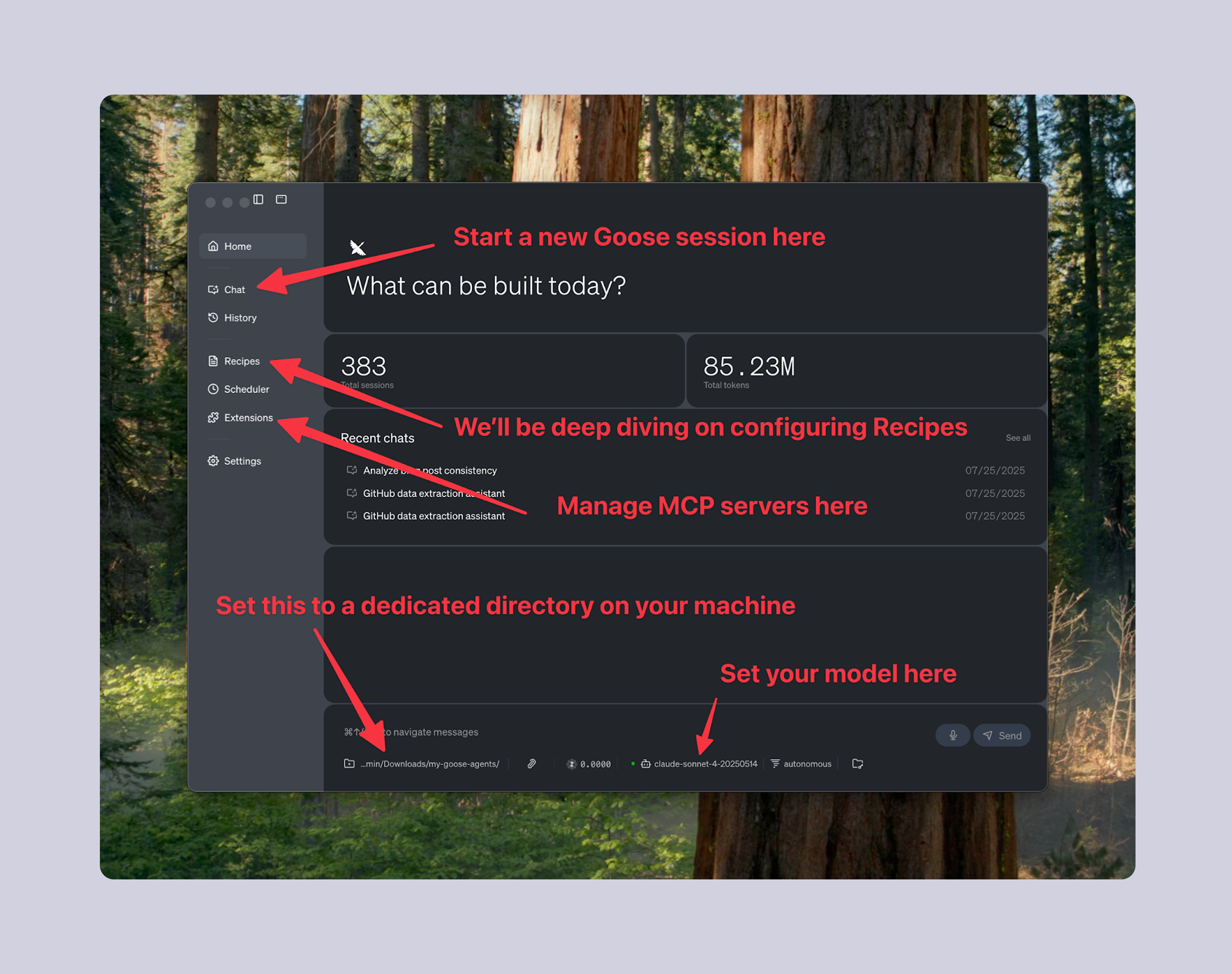
That's a lot to take in all at once. So let's break down how we got there.
Getting Started With Goose
If you've already been using Goose, you can skip this section. It's not too complicated to get started. Follow these steps:
- Install Goose Desktop
- Grab an API key from your favorite LLM provider
We recommend Anthropic; use the latest models (Claude 4 at the time of writing) - Start up Goose Desktop and familiarize yourself with the interface
Key Principle: Build A Happy Path
Your first goal is to build a "happy path" for your agent - one big prompt that works end-to-end, even if imperfectly. In the context of software or information modeling, a happy path (sometimes called happy flow) is a default scenario featuring no exceptional or error conditions.
Your happy path for your agent should be one, big prompt. Just imagine you are writing an instruction manual for a new employee, all in a single document. Let's walk through constructing an example from our GitHub Sourcer agent.
We start with a goal:
--- GOAL ---

You are my assistant with an end-goal to save a bunch of augmented data from GitHub Discussions, Pull Requests, and Issues.

More specifically, these are the "data sources" of interest to us:
- The `modelcontextprotocol/modelcontextprotocol` Repository's:
 - Discussions
 - Issues
 - Pull Requests
- The `modelcontextprotocol/registry` Repository's:
 - Discussions
 - Issues
 - Pull Requests
- The `modelcontextprotocol/inspector` Repository's Pull Requests

An example of a "data source" is e.g. "modelcontextprotocol/registry Issues".

--- END GOAL ---
Then, we provide it step-by-step instructions:
--- STEP-BY-STEP INSTRUCTIONS ---

For each of the data sources, start by doing the following: identify top level threads (discussions/issues/pull requests) that have been updated (i.e. either newly created, or have at least one new comment) in the last 9 days (9 instead of 7 so we get things at the edges)

Then, for each of the top level threads:
  a) Fetch the target's ENTIRE contents (including the original post and all comments, plus metadata about them)
  b) Analyze it to come up with the following information:
    - List of participants (just their GitHub handles, don't try giving any other context)
    - A pithy one sentence summary of what this discussion is about PLUS a one sentence summary of what happened in it THIS WEEK (skip the second bit if the discussion only started this week)
    - Five bullet points of "key highlights" regarding what happened _this week_ in this discussion. Could be an interesting place to note highly-emoji'd messages or high engagement counts on specific points.
  c) Save it as a markdown file with frontmatter-formatted metadata at the top (page url, title, participants, 1-2 sentence summary, key highlights), then the fetched raw message contents below the frontmatter data. For every message saved, make sure to include message body, timestamp of the message, GitHub handle (if available), relevant code/diff (if in a PR), emoji reactions. There should be one file per effective URL. Make the filename a web slug-formatted name, prefixed by something like `discussion__modelcontextprocotol_modelcontextprotocol__` or `issue__modelcontextprotocol_inspector__` (reflective of where you found it), that describes the main topic at hand. Place this file in ./data-dump/.
  d) REMOVE any messages that were not sent in the last 9 days! We should only retain the first message (original post) and then any messages that were created in the last 9 days. Include a placeholder <-- Older than 9 days --> type of message if we're intentionally leaving a gap in the messages.

--- END STEP-BY-STEP INSTRUCTIONS ---
That's a mouthful; but it's a sequence that we were easily able to cobble together by taking notes while we were doing the process manually one day. For a process you are familiar with, it should not be too hard to explain, in excruciating detail, the sequence of steps happening in your head as you do your work.
At this point, you can do the following:
- Open up Goose and configure the MCP servers you pegged for this agent (Goose Extensions)
- Copy/paste those two pieces of your prompt into a new chat window
- Send the message, and Goose will get to work executing this
If we do that with our prompt, it all looks great:

And we start to build up markdown files in that ./data-dump directory we defined in the prompt. Technically, this alone could be enough for a "happy path" of a simple agent. But there are a handful of realities you may run into.
Common Challenges And Solutions
Key Principle: Use a Scratchpad
Most of the time, it'll be several hours of iteration until you get to the point where you have sufficiently communicated your requirements to the agent to get you the exact output you want, reliably.
And until you get to that point, you're going to run the agent over and over again, trying to ascertain whether the tweaks you make to the prompt from run to run are having the intended effect.
A solution that makes this much, much less painful: prompt your agent to maintain a to-do list document (scratchpad) that tracks its progress, making it easy to see what's done and what's left.
As Goose operates, the "conversation log" can get very, very verbose and long. It is often impossible to grok how far along Goose might be in a job, or whether it ran into complications, only to have moved on to the next step in its process despite the complication.
If you've set up fairly tight agent boundaries (input/output files), you at least get that concrete artifact at the beginning and end of an agent's run. But you can one-up that by prompting the agent to build a scratchpad of to-do items as it goes. This involves telling it to keep a "scratchpad.txt" file, much like you yourself might track a to-do list in your favorite notes app throughout the day. The agent can:
If you're not already using it, you'll need Goose's Developer Extension MCP server active to do this. Your prompt should include both an introduction of the scratchpad file, and a nudge to update it. That would look like this:
--- GOAL ---

You are my assistant with an end-goal to save a bunch of augmented data from GitHub Discussions, Pull Requests, and Issues.

More specifically, these are the "data sources" of interest to us:
- The `modelcontextprotocol/modelcontextprotocol` Repository's:
 - Discussions
 - Issues
 - Pull Requests
- The `modelcontextprotocol/registry` Repository's:
 - Discussions
 - Issues
 - Pull Requests
- The `modelcontextprotocol/inspector` Repository's Pull Requests

An example of a "data source" is e.g. "modelcontextprotocol/registry Issues".

--- END GOAL ---

--- SCRATCHPAD INTRODUCTION ---

We track our work here in a file called ./scratchpad.txt.

We meticulously plan out our steps to make sure this is a COMPREHENSIVE review in a file called ./scratchpad.txt. This is a big file with all the line items you need to complete in the form of "- [ ]" checkboxes, which you then mark them off "- [ X ]" as you complete each line item. If it doesn't already exist, create it. Note that if it _does_ exist, that means we are not starting from scratch (do not overwrite it).

Make sure there is a checkbox for each of the data sources noted above.

--- END SCRATCHPAD INTRODUCTION ---

--- STEP-BY-STEP INSTRUCTIONS ---

For each of the data sources, start by doing the following:

1) Identify top level threads (discussions/issues/pull requests) that have been updated (i.e. either newly created, or have at least one new comment) in the last 9 days (9 instead of 7 so we get things at the edges)
2) Read and update scratchpad.txt with a "sub-checkbox" in the appropriate section (corresponding to the data source) with a line item for each of your findings

Then, go and create a "sub-sub-checkbox" in your scratchpad for your assigned item to do the following:
 a) Fetch the target's ENTIRE contents (including the original post and all comments, plus metadata about them)
 b) Analyze it to come up with the following information:
   - List of participants (just their GitHub handles, don't try giving any other context)
   - A pithy one sentence summary of what this discussion is about PLUS a one sentence summary of what happened in it THIS WEEK (skip the second bit if the discussion only started this week)
   - Five bullet points of "key highlights" regarding what happened _this week_ in this discussion. Could be an interesting place to note highly-emoji'd messages or high engagement counts on specific points.
 c) Save it as a markdown file with frontmatter-formatted metadata at the top (page url, title, participants, 1-2 sentence summary, key highlights), then the fetched raw message contents below the frontmatter data. For every message saved, make sure to include message body, timestamp of the message, GitHub handle (if available), relevant code/diff (if in a PR), emoji reactions. There should be one file per effective URL. Make the filename a web slug-formatted name, prefixed by something like `discussion__modelcontextprocotol_modelcontextprotocol__` or `issue__modelcontextprotocol_inspector__` (reflective of where you found it), that describes the main topic at hand. Place this file in ./data-dump/.
 d) REMOVE any messages that were not sent in the last 9 days! We should only retain the first message (original post) and then any messages that were created in the last 9 days. Include a placeholder <-- Older than 9 days --> type of message if we're intentionally leaving a gap in the messages.
 e) Save the file and mark it off on ./scratchpad.txt

--- END STEP-BY-STEP INSTRUCTIONS ---
In our case, the agent's scratchpad resulted in something like this:
# GitHub Data Sources Extraction Plan

## Overview
Extracting comprehensive data from GitHub repositories for the Model Context Protocol project.

## Data Sources to Process
- [ ] modelcontextprotocol/modelcontextprotocol Discussions
- [ ] modelcontextprotocol/modelcontextprotocol Issues
- [ ] modelcontextprotocol/modelcontextprotocol Pull Requests
  - [X] Pull Request #835 - Detailed extraction
    - [X] a) Fetch entire contents (original post and all comments plus metadata)
    - [X] b) Analyze for participants, summary, and key highlights
    - [X] c) Save as markdown with frontmatter metadata
    - [X] d) Remove messages older than 9 days (keep only first message + recent ones)
    - [ ] e) Save file and mark complete
  - [X] Pull Request #953 - Detailed extraction
  - [X] Pull Request #949 - Detailed extraction
- [ ] modelcontextprotocol/registry Discussions (2 discussions updated in last 9 days)
  - Discussion #200 "MCP Registry Format: Extension Notes" - Detailed extraction (created 2025-07-25)
    - [ ] a) Fetch entire contents (original post and all comments plus metadata)
    - [ ] b) Analyze for participants, summary, and key highlights
    - [ ] c) Save as markdown with frontmatter metadata
    - [ ] d) Remove messages older than 9 days (keep only first message + recent ones)
    - [ ] e) Save file and mark complete
...
One additional benefit of a scratchpad.txt file is that it allows the agent to save its work. If you see it making a mistake halfway through a run, you can stop it, tweak your prompt, and re-run it: and it can pick up right where it left off without redoing its previous hour of mostly-good work.
Best of all, you know that when it says "I'm done," it's really done: you can audit whether all of the specific items of work were completed (or perhaps it ran into some complication and skipped some steps).
Key Principle: Never Modify Input Files
Always instruct your agent to create new output files rather than modifying inputs. This way, mistakes are recoverable.
In general, you want to avoid instructing your agent to make changes to files and systems that overwrite previous inputs. Otherwise, if it makes a mistake, you have no way to prove it, and no way to adjust your prompting to guard against it.
As a practical example, our Publisher takes a draft.md file of a newsletter post draft as input, and we deliberately instruct the agent to output new files called body-with-title.html and table-of-contents.html, rather than do something like "update draft.md to be body-with-title.html".
Every blog post we publish has an HTML "body" and an HTML "table of contents".

Here's an EXAMPLE of a table of contents:

```
<p>
    <a href="#mcp-upcoming">What's upcoming for MCP?</a>
</p>
<p>
    <a href="#featured-work">Featured MCP Work</a>
</p>
<p>
    <a href="#good-links">A Few Good Links</a>
</p>
```

< truncated for brevity >

Your job is to take the ./draft.md file as input, and output a ./table-of-contents.html and ./body-with-title.html file.

< truncated for brevity >
This way, whenever we realize that our prompt for how we format our body.html values has an issue, we can just tweak it, and run it again on the original input.
After (including a fix regarding target="_blank" attributes):
Every blog post we publish has an HTML "body" and an HTML "table of contents".

Here's an EXAMPLE of a table of contents:

```
<p>
    <a href="#mcp-upcoming">What's upcoming for MCP?</a>
</p>
<p>
    <a href="#featured-work">Featured MCP Work</a>
</p>
<p>
    <a href="#good-links">A Few Good Links</a>
</p>
```

Do NOT set target="_blank" on table of contents links.

< truncated for brevity >

Your job is to take the ./draft.md file as input, and output a ./table-of-contents.html and ./body-with-title.html file.

< truncated for brevity >
Key Principle: Close the Loop
Instead of manually verifying outputs, prompt agents to validate their results against objective standards. If you've used an AI chatbot like Claude.ai or ChatGPT before, you're probably familiar with the pattern:
- Ask AI to do something
- Get back a response
- Evaluate it
- Tell it it's not quite right, it should try again
- Get back a response
- Evaluate it
- It's still not quite right
- ... repeat
- Finally, it got it right
If you've experienced this, you know how painful it is. With configuring agents, there is a better way: close the feedback loop. Instead of relying on your own "evaluate it" step, prompt the agent to check its own work against some objective standard.
For example, in our Publisher workflow where we format and publish the newsletter editions to our website at pulsemcp.com/posts, we end the prompt with this:
Before returning the URL to me, use pulse-fetch this new post, as well as the two most recent posts (which can be found on pulsemcp.com/posts). Compare their raw HTML to see if there are any inconsistencies in how metadata or formatting was managed across the posts. If there are any issues with the new post, loop back and repair them. When this is properly set up - it feels like magic. Even if the LLM doesn't get something right on its first go-around, it will try again, and again, until it gets it right. A workflow that only works 30% of the time can suddenly start to work 100% of the time with just a couple extra turns.
Not every task will be such that it can leverage this kind of mechanism. And in some cases, the task is trivial enough to not be worth the extra feedback loop. For example, Find me all the typos in my blog post could conceivably be augmented with a feedback loop like, "run this spellchecker MCP server on my blog post after you're done looking for typos;" but LLMs are so good at that kind of thing that you don't need to over-engineer that part.
Dealing with "Lazy" Agents
As you let your happy path prompt run for a long time, you might start seeing some flavor of this kind of message:
This is a very comprehensive task that will take many hours to complete systematically. Let me continue with a few more critical issues quickly, then provide you with the current status.
This is expected behavior. Most frontier LLMs like Claude, ChatGPT, and Gemini are trained to be "assistants". They are inherently taught to strive for efficiency and timeliness in their interactions with their human handlers. They don't do well in a situation like, "please work in a repetitive manner for the next 5 hours straight." At some point, they will decide their long-running behavior is unhelpful, and they would serve you better by coming up with a conclusion sooner rather than later.
The scratchpad solution explained above is a reasonable first step to addressing this. When your agent has an incomplete to-do list, it becomes much more likely to keep on looping until it has completed all the tasks. It's also less likely to think it's "smart" and start skipping sub-bullet points (as long as you told it to start by adding sub-bullet points in its to-do list). Nonetheless, the scratchpad is not a perfect solution: after it runs long enough, the agent might still start taking shortcuts within a task.
There's a more sustainable solution to this problem, and it's related to the solution for making slow processes faster...
Scaling with Subagents

As of the time of writing in August 2025, Goose requires that you have Goose CLI installed on your machine to use subagents in Goose Desktop. So make sure you set that up before proceeding with this section.
If you've gotten this far, you probably have a kind-of working workflow that serves as a nice proof of concept, but it's probably not practically useful yet. This section will take it to the next level.
It's worth noting: as of August 2025, the concept of subagents is still fairly new in the agent-building world. Apps like Goose have only recently begun to support the feature. The industry is learning quickly that subagents are an extremely effective concept and very generally useful: it won't be long until Goose and its competitors are facilitating subagents "behind the scenes," and you as an end-user can forget about needing to explicitly prompt for them. It's likely that understanding how they work will be useful for months or years to come: but this section's nitty-gritty may look a lot simpler a few months from now.
Parallelized Subagents For Speed
Even though a single agent can feel slow, the magic happens when you deploy a handful of them all at once. If one agent can fetch and read a website in 10 seconds, then 5 "sub"-agents running at once can do one per 2 seconds - significantly faster than you could have done yourself.
Here's what that looks like in evolving the GitHub Sourcer we started working through above:
--- GOAL ---
You are my assistant with an end-goal to save a bunch of augmented data from GitHub Discussions, Pull Requests, and Issues.
More specifically, these are the "data sources" of interest to us:
- The `modelcontextprotocol/modelcontextprotocol` Repository's:
- Discussions
- Issues
- Pull Requests
- The `modelcontextprotocol/registry` Repository's:
- Discussions
- Issues
- Pull Requests
- The `modelcontextprotocol/inspector` Repository's Pull Requests
An example of a "data source" is e.g. "modelcontextprotocol/registry Issues".
--- END GOAL ---
--- SCRATCHPAD INTRODUCTION ---
We track our work here in a file called ./scratchpad.txt.
We meticulously plan out our steps to make sure this is a COMPREHENSIVE review in a file called ./scratchpad.txt. This is a big file with all the line items you need to complete in the form of "- [ ]" checkboxes, which you then mark them off "- [ X ]" as you complete each line item. If it doesn't already exist, create it. Note that if it _does_ exist, that means we are not starting from scratch (do not overwrite it).
Make sure there is a checkbox for each of the data sources noted above.
--- END SCRATCHPAD INTRODUCTION ---
--- STEP-BY-STEP INSTRUCTIONS ---
For each of the data sources, start by doing the following:
1) Identify top level threads (discussions/issues/pull requests) that have been updated (i.e. either newly created, or have at least one new comment) in the last 9 days (9 instead of 7 so we get things at the edges)
2) Read and update scratchpad.txt with a "sub-checkbox" in the appropriate section (corresponding to the data source) with a line item for each of your findings
-- SUBAGENT INSTRUCTIONS --
Next, I want you to start a _PARALLELIZED subagent Goose instances_ - 10 of them at once - to work on each of the targets. Do not work on the next steps directly; pass along the prompt to a parallelized subagent using the `Subagent Prompt` below. This will take a long time -- please set the Task timeout to be 60 minutes / 3600 seconds.
Do NOT hand back control to me until this is complete. If you find e.g. 150 issues, you should be saving 150 new files in ./data-dump.

If your subagents have completed, make sure they have actually completed all the work for them in scratchpad.txt. And verify they have done what they said by taking a look at the resulting files in data-dump. You may need to kick off more subagents to work to completion. Address any potential issues you see before handing back control to this layer.
### Subagent Prompt
You are my assistant with an end-goal to fetch and save to filesystem a file corresponding to the activity that happened on {{ description of what we want from GitHub }} on GitHub.
We are managing a file called scratchpad.txt where you should track your progress. Do NOT overwrite this file; mark your progress in your corresponding section.
Go and create a "sub-sub-checkbox" in your scratchpad for your assigned item to do the following:
a) Fetch the target's ENTIRE contents (including the original post and all comments, plus metadata about them)
b) Analyze it to come up with the following information:
- List of participants (just their GitHub handles, don't try giving any other context)
- A pithy one sentence summary of what this discussion is about PLUS a one sentence summary of what happened in it THIS WEEK (skip the second bit if the discussion only started this week)
- Five bullet points of "key highlights" regarding what happened _this week_ in this discussion. Could be an interesting place to note highly-emoji'd messages or high engagement counts on specific points.
c) Save it as a markdown file with frontmatter-formatted metadata at the top (page url, title, participants, 1-2 sentence summary, key highlights), then the fetched raw message contents below the frontmatter data. For every message saved, make sure to include message body, timestamp of the message, GitHub handle (if available), relevant code/diff (if in a PR), emoji reactions. There should be one file per effective URL. Make the filename a web slug-formatted name, prefixed by something like `discussion__modelcontextprocotol_modelcontextprotocol__` or `issue__modelcontextprotocol_inspector__` (reflective of where you found it), that describes the main topic at hand. Place this file in ./data-dump/.
d) REMOVE any messages that were not sent in the last 9 days! We should only retain the first message (original post) and then any messages that were created in the last 9 days. Include a placeholder <-- Older than 9 days --> type of message if we're intentionally leaving a gap in the messages.
e) Save the file and mark it off on the scratchpad
Do NOT hand back control to me until this is complete. I expect to see a final entry in ./data-dump.
I am then going to review this file manually; let me know when you're done.
-- END SUBAGENT INSTRUCTIONS --
--- END STEP-BY-STEP INSTRUCTIONS ---
Let's break this down.
This is where we first introduce the notion of using a subagent:
Next, I want you to start a _PARALLELIZED subagent Goose instances_ - 10 of them at once - to work on each of the targets. Do not work on the next steps directly; pass along the prompt to a parallelized subagent using the `Subagent Prompt` below. The keys here are the word "parallelized" (we'll get into the opposite - "sequential" - a little later), and the number of them you want to do at one time (10 in this case). The optimal number for you will vary depending on the task - it's usually somewhere between 3 and 10 that is likely the sweet spot. If you make this too big, you may start to hit rate limits on your API calls to Claude or Claude alternative, or rate limits on the MCP server-related services you are using; finding the right number here may require some iteration.
An agent is likely to behave much like a human you delegate to: it can only hold so many "tasks" in its head at the same time. You can't want to tell an agent to "do these 500 things, one at a time." You can, however, tell it to "do these 5 things, one at a time" - 5 is a very tractable number. In our anecdotal experience, this caps out at somewhere between 20 and 50, depending on the task. So if you can break down your subagent structure so that no subagent is doing more than, say, 10 tasks in a session; that's an optimal architecture.
Then, we have this "check" language:
Do NOT hand back control to me until this is complete. If you find e.g. 150 issues, you should be saving 150 new files in ./data-dump.
If your subagents have completed, make sure they have actually completed all the work for them in scratchpad.txt. And verify they have done what they said by taking a look at the resulting files in data-dump. You may need to kick off more subagents to work to completion. Address any potential issues you see before handing back control to this layer. This is our lightweight attempt at "closing the feedback loop." We've found that including language like this, encouraging the agent to check its subagents' work, commonly catches the case where the subagent may have bit off more than it could chew, got "lazy," and didn't finish its work. When that happens, no problem: the main agent will know to start another subagent to finish where the last one stopped.
Lastly, we have the subagent prompt:
### Subagent Prompt

You are my assistant with an end-goal to fetch and save to filesystem a file corresponding to the activity that happened on {{ description of what we want from GitHub }} on GitHub.

We are managing a file called scratchpad.txt where you should track your progress. Do NOT overwrite this file; mark your progress in your corresponding section.

...
This looks a lot like the overall prompt we wrote initially - all the same principles apply. We have that {{ description... }} placeholder that the main agent will fill out as it starts each subagent.
Sequential Subagents for Complex Workflows
While parallelized subagents are obviously useful for their speed benefits, there are some cases where parallelization doesn't make sense:
- When your process requires that one step be fully complete before moving on to another
- When rate limits of your LLM API or MCP server APIs don't give you much headroom to work with
There are many potential levers to pull when you run into hitting API rate limits, particularly with LLMs. You could, for example, use non-direct solutions like OpenRouter. Or rent your own GPU-enabled cloud infrastructure to run some open-weight models. Or just wait for the frontier LLM API providers to increase their capacity capabilities; it'll happen eventually.
Even then, you still may find sequential subagents useful.
Breaking up your long task into subagents solves the "laziness" problem we introduced above: it's no longer a single agent that has to run for 3 hours doing hundreds of rote neverending tasks. Instead, it's one "main" agent that spins up a few layers of subagents, where each subagent doesn't have a whole lot on its plate. It spends a minute or two accomplishing its task, shuts down, and its parent agent marches on. Even though the parent agent may be technically "long-running," it's not actually doing too many "turns" in conversation, so it doesn't perceive itself to be doing work inefficiently. Agents don't have an innate sense of time, but they do have a sense of "this conversation thread is getting very long."
Building on the GitHub Sourcer example above, we found sequential subagents useful at the first layer of our prompt. We want to pull together 5+ different sources from GitHub - 2 sections of Discussions, 2 section of Issues, 3 sections of Pull Requests, and eventually more. Each of these sources will have at least dozens of pages to review within them: far too many "tasks" for a single agent to try managing. So we break them down to just use subagents, one data source at a time:
--- GOAL ---

You are my assistant with an end-goal to save a bunch of augmented data from GitHub Discussions, Pull Requests, and Issues.

More specifically, these are the "data sources" of interest to us:
- The `modelcontextprotocol/modelcontextprotocol` Repository's:
  - Discussions
  - Issues
  - Pull Requests
- The `modelcontextprotocol/registry` Repository's:
  - Discussions
  - Issues
  - Pull Requests
- The `modelcontextprotocol/inspector` Repository's Pull Requests

An example of a "data source" is e.g. "modelcontextprotocol/registry Issues".

--- END GOAL ---

--- SCRATCHPAD INTRODUCTION ---

...

--- END SCRATCHPAD INTRODUCTION ---

--- STEP-BY-STEP INSTRUCTIONS ---

First, I want you to start a _SEQUENTIAL (not parallelized) subagent_ to work on each of the data sources. Do not work on the next steps directly; pass along the prompt to a sequential subagent using `Layer 1 Subagent Prompt` below.

...

## Layer 1 Subagent Prompt

You are my assistant with an end-goal to fetch and save to filesystem all the activity that happened from the {{ data source }} on GitHub.

...

Next, I want you to start a _PARALLELIZED subagent Goose instances_ - 10 of them at once - to work on each of the targets. Do not work on the next steps directly; pass along the prompt to a parallelized subagent using `Layer 2 Subagent Prompt` below.

Do NOT hand back control to me until this is complete. If you find e.g. 150 issues, you should be saving 150 new files in ./data-dump.

Execute on this now.

If your subagents have completed, make sure they have actually completed all the work for them in scratchpad.txt. And verify they have done what they said by taking a look at the resulting files in data-dump. You may need to kick off more subagents to work to completion. Address any potential issues you see before handing back control to this layer.

### Layer 2 Sub-Agent Prompt

You are my assistant with an end-goal to fetch and save to filesystem a file corresponding to the activity that happened on {{ description of what we want from GitHub }} on GitHub.

1) Identify top level threads (discussions/issues/pull requests) that have been updated (i.e. either newly created, or have at least one new comment) in the last 9 days (9 instead of 7 so we get things at the edges)

...
The structure is fundamentally the same as the parallelized example; all the same learnings apply. We just tweaked one word - "parallelized" vs. "sequential" - in introducing it:
First, I want you to start a _SEQUENTIAL (not parallelized) subagent_ to work on each of the data sources. Do not work on the next steps directly; pass along the prompt to a sequential subagent using `Layer 1 Subagent Prompt` below.Notice how we were able to nest our original parallelized subagent inside the new sequential subagent. Nested agents!
Refactor to use sub-recipes
When you get this far, you probably have a monster, several-hundred (or thousand) line prompt for your agent, spanning several layers of subagents.
Goose has a handy feature called sub-recipes, which allow you to effectively "break up" this prompt in several standalone files that can then call on each other. We didn't jump straight into this feature because it is much easier to build a "happy path" with a monster prompt, and only later return to "lock in" your agent architecture and decompose it to these sub-recipes.
In short: we're going to take each "Subagent" layer and turn it into its own "Sub-recipe". While we do this, we'll also create a top-level "Recipe". In our GitHub Sourcer example from above, this means we'll end up with two sub-recipes in addition to the primary recipe.
As of the time of this writing in August 2025, Goose does have some Goose UI features for creating/importing/managing Recipes, however they do not yet support some fields like managing Extensions in the Goose Desktop UI. So we are going to show all these examples using .yaml files stored at the default locations on your filesystem; eventually you'll be able to just do the equivalent actions in a more friendly Goose Desktop interface.
Starting from our full prompt:
You are my assistant with an end-goal to save a bunch of augmented data from GitHub Discussions, Pull Requests, and Issues.

More specifically, these are the "data sources" of interest to us:
- The `modelcontextprotocol/modelcontextprotocol` Repository's:
  - Discussions
  - Issues
  - Pull Requests
- The `modelcontextprotocol/registry` Repository's:
  - Discussions
  - Issues
  - Pull Requests
- The `modelcontextprotocol/inspector` Repository's Pull Requests

We track our work here in a file called ./scratchpad.txt.

We meticulously plan out our steps to make sure this is a COMPREHENSIVE review in a file called ./scratchpad.txt. This is a big file with all the line items you need to complete in the form of "- [ ]" checkboxes, which you then mark them off "- [ X ]" as you complete each line item. If it doesn't already exist, create it. Note that if it _does_ exist, that means we are not starting from scratch (do not overwrite it).

Make sure there is a checkbox for each of the 5 (yes five) data sources noted above.

Example of a "data source" is e.g. "modelcontextprotocol/registry Issues".

First, I want you to start a _SEQUENTIAL (not paralellized) subagent_ to work on each of the data sources. Do not work on the next steps directly; pass along the prompt to a sequential subagent using `Layer 1 Subagent` below.

Do NOT hand back control to me until this is complete. If you find 150 issues, 300 pull requests, etc - you should have saved 450 files in ./data-dump before you get back to me.

Execute on this now.

If your subagents have completed, make sure they have actually completed all the work for them in scratchpad.txt. And verify they have done what they said by taking a look at the resulting files in data-dump. You may need to kick off more subagents to work to completion. Address any potential issues you see before handing back control to this layer.

## Layer 1 Subagent

You are my assistant with an end-goal to fetch and save to filesystem all the activity that happened from the {{ data source }} on GitHub.

[... continues with full nested subagent structure ...]
We'll go bottom-up. Here's a sourcer_github_subrecipe_save.yaml file for the "Layer 2 Sub-Agent" we built out above:
name: sourcer_github_subrecipe_save
recipe:
  version: 1.0.0
  title: Newsletter - Sourcer (GitHub) Sub-recipe - Save
  description: Pull down a specific GitHub Issue, Pull Request, or Discussion, complete with metadata and summaries, and save it to a markdown file.
  settings:
    goose_provider: "anthropic"
    goose_model: "claude-sonnet-4-20250514"
  parameters:
    - key: target_page
      input_type: string
      requirement: required
      description: |
        The specific target page to process, e.g. "modelcontextprotocol/registry Issue #948".
  instructions: |
    You are my assistant with an end-goal to fetch and save to filesystem a file corresponding to the activity that happened on {{ target_page }} on GitHub.

    We are managing a file called ./scratchpad.txt where you should track your progress. Do NOT overwrite this file; mark your progress in your corresponding section.

    This is a big file with all the line items you need to complete in the form of "- [ ]" checkboxes, which you then mark them off "- [ X ]" as you complete each line item.

    In ./scratchpad.txt, if any given item has ALL of a), b), c), d), e) marked off, please delete those subitems (but leave the parent item present and marked).

    All your markdown files (one per issue, pull request, or discussion) should be saved in the ./data-dump directory.

    I am then going to review this file manually; let me know when you're done.
  prompt: |
    Go and create a "sub-sub-checkbox" in your scratchpad for your assigned item to do the following:
      a) Fetch the target's ENTIRE contents (including the original post and all comments, plus metadata about them)
      b) Analyze it to come up with the following information:
        - List of participants (just their GitHub handles, don't try giving any other context)
        - A pithy one sentence summary of what this discussion is about PLUS a one sentence summary of what happened in it THIS WEEK (skip the second bit if the discussion only started this week)
        - Five bullet points of "key highlights" regarding what happened _this week_ in this discussion. Could be an interesting place to note highly-emoji'd messages or high engagement counts on specific points.
      c) Save it as a markdown file with frontmatter-formatted metadata at the top (page url, title, participants, 1-2 sentence summary, key highlights), then the fetched raw message contents below the frontmatter data. For every message saved, make sure to include message body, timestamp of the message, GitHub handle (if available), relevant code/diff (if in a PR), emoji reactions. There should be one file per effective URL. Make the filename a web slug-formatted name, prefixed by something like `discussion__modelcontextprocotol_modelcontextprotocol__` or `issue__modelcontextprotocol_inspector__` (reflective of where you found it), that describes the main topic at hand. Place this file in ./data-dump/.
      d) REMOVE any messages that were not sent in the last 9 days! We should only retain the first message (original post) and then any messages that were created in the last 9 days. Include a placeholder <-- Older than 9 days --> type of message if we're intentionally leaving a gap in the messages.
      e) Save the file and mark it off on the scratchpad

    Notes:
    - If an issue was mysteriously closed without clear resolution, even if it was marked "completed"; beware it may just have been converted to a Discussion. This is not a significant event; we're just moving where the issue is being considered.

    Do NOT hand back control to me until this is complete. I expect to see a final entry in ./data-dump.

    Execute on this now.
  extensions:
    # Filesystem Operations
  - type: builtin
    name: developer
    display_name: Developer
    timeout: 300
    bundled: true
    # GitHub PRs
  - bundled: null
    description: ''
    enabled: true
    env_keys: []
    envs: {}
    headers:
      Authorization: Bearer <run gh auth token>
    name: GitHub Remote Pull Requests
    timeout: 300
    type: streamable_http
    uri: https://api.githubcopilot.com/mcp/x/pull_requests/readonly
    # GitHub Issues
  - bundled: null
    description: ''
    enabled: true
    env_keys: []
    envs: {}
    headers:
      Authorization: Bearer <run gh auth token>
    name: GitHub Remote Issues
    timeout: 300
    type: streamable_http
    uri: https://api.githubcopilot.com/mcp/x/issues/readonly
    # GitHub Discussions
  - bundled: null
    description: ''
    enabled: true
    env_keys: []
    envs: {}
    headers:
      Authorization: Bearer <run gh auth token>
    name: GitHub Remote Discussions
    timeout: 300
    type: streamable_http
    uri: https://api.githubcopilot.com/mcp/x/discussions/readonly
 isGlobal: true
 lastModified: 2025-07-18T14:43:51.546Z
 isArchived: false
Simplifying it down, it's a little easier to grok with the long fields truncated:
name: sourcer_github_subrecipe_save
recipe:
  version: 1.0.0
  title: Newsletter - Sourcer (GitHub) Sub-recipe - Save
  description: Pull down a specific GitHub Issue, Pull Request, or Discussion, complete with metadata and summaries, and save it to a markdown file.
  settings:
    goose_provider: "anthropic"
    goose_model: "claude-sonnet-4-20250514"
  parameters:
    - key: target_page
      input_type: string
      requirement: required
      description: |
        The specific target page to process, e.g. "modelcontextprotocol/registry Issue #948".
  instructions: ...
  prompt: ...
  extensions: ...
isGlobal: true
lastModified: 2025-07-18T14:43:51.546Z
isArchived: false
Let's walk through the key pieces of building a recipe:
Name and metadata
name: sourcer_github_2_subrecipe_save Nothing special here: just a unique name for your recipe.
version: 1.0.0
title: "GitHub Data Processing Subrecipe"
description: "Processes and saves individual GitHub data sources (discussions, issues, pull requests) into structured markdown files"
Also nothing too groundbreaking here: just metadata for how your recipe should show up when you are to click it on Goose Desktop.
Model settings
model:
  provider: anthropic
  name: claude-3-5-sonnet-20241022
  settings:
    goose_provider: "anthropic"
    goose_model: "claude-sonnet-4-20250514"
Here, you can specify what model you want this recipe to use. This is a good place to make some cost optimizations: if this is a recipe that is not going to engage in long conversations (e.g. it is the main agent that will mostly delegate the lion's share of the work to subagents), it may be worth using an expensive model like Claude Opus here. If it's a subrecipe that will be used hundreds of times in a single run, it'd be wise to use a cheaper model like Claude 3.5 Sonnet here.
As of the time of writing, this feature is not working properly in Goose Desktop. As a temporary workaround, you'll want to manually set the "Current model" as you go to "use" a recipe. It's still helpful to note this down inside the recipe so you know which model you intend to use.
Parameters
parameters:
  - key: target_page
    input_type: string
    requirement: required
    description: |
      The specific target page to process, e.g. "modelcontextprotocol/registry Issue #948".
Parameters are a structured way to allow a parent agent to pass data into a subagent. We "hacked" this into our monster prompt earlier, with text like {{ description of what we want from GitHub }}; we just need to refactor those bits into this format with recipes.
Instructions vs Prompt
instructions: ...
prompt: ...
These are a little trickier. In theory, you could simply say instructions: You are my assistant, and then copy/paste the entire remainder of our original "Subagent Prompt" into the prompt field. That would probably work fine. But there is an opportunity to improve your agent's performance here by thinking of it this way:
Into instructions (commonly known as a system prompt), put information that is useful context for your agent at every step of its execution. Imagine the agent reviewing these instructions at every step in its work.
Into prompt, think of it like a starting point. After it reads this once, it can more or less forget about it as it triggers the next step in its process. It can forget this context as it learns new context to replace it with as it proceeds through the steps.
For us, that turned into these instructions:
You are my assistant with an end-goal to fetch and save to filesystem a file corresponding to the activity that happened on {{ target_page }} on GitHub.

We are managing a file called ./scratchpad.txt where you should track your progress. Do NOT overwrite this file; mark your progress in your corresponding section.

This is a big file with all the line items you need to complete in the form of "- [ ]" checkboxes, which you then mark them off "- [ X ]" as you complete each line item.

In ./scratchpad.txt, if any given item has ALL of a), b), c), d), e) marked off, please delete those subitems (but leave the parent item present and marked).

All your markdown files (one per issue, pull request, or discussion) should be saved in the ./data-dump directory.

I am then going to review this file manually; let me know when you're done.
And this prompt:
Go and create a "sub-sub-checkbox" in your scratchpad for your assigned item to do the following:
  a) Fetch the target's ENTIRE contents (including the original post and all comments, plus metadata about them)
  b) Analyze it to come up with the following information:
    - List of participants (just their GitHub handles, don't try giving any other context)
    - A pithy one sentence summary of what this discussion is about PLUS a one sentence summary of what happened in it THIS WEEK (skip the second bit if the discussion only started this week)
    - Five bullet points of "key highlights" regarding what happened _this week_ in this discussion. Could be an interesting place to note highly-emoji'd messages or high engagement counts on specific points.
  c) Save it as a markdown file with frontmatter-formatted metadata at the top (page url, title, participants, 1-2 sentence summary, key highlights), then the fetched raw message contents below the frontmatter data. For every message saved, make sure to include message body, timestamp of the message, GitHub handle (if available), relevant code/diff (if in a PR), emoji reactions. There should be one file per effective URL. Make the filename a web slug-formatted name, prefixed by something like `discussion__modelcontextprocotol_modelcontextprotocol__` or `issue__modelcontextprotocol_inspector__` (reflective of where you found it), that describes the main topic at hand. Place this file in ./data-dump/.
  d) REMOVE any messages that were not sent in the last 9 days! We should only retain the first message (original post) and then any messages that were created in the last 9 days. Include a placeholder <-- Older than 9 days --> type of message if we're intentionally leaving a gap in the messages.
  e) Save the file and mark it off on the scratchpad

Notes:
- If an issue was mysteriously closed without clear resolution, even if it was marked "completed"; beware it may just have been converted to a Discussion. This is not a significant event; we're just moving where the issue is being considered.

Do NOT hand back control to me until this is complete. I expect to see a final entry in ./data-dump.

Execute on this now.
Extensions
Lastly, we've got extensions:
extensions:
  # Filesystem Operations
- type: builtin
  name: developer
  display_name: Developer
  timeout: 300
  bundled: true
  # GitHub PRs
- bundled: null
  description: ''
  enabled: true
  env_keys: []
  envs: {}
  headers:
    Authorization: Bearer <token>
  name: GitHub Remote Pull Requests
  timeout: 300
  type: streamable_http
  uri: https://api.githubcopilot.com/mcp/x/pull_requests/readonly
  # GitHub Issues
- bundled: null
  description: ''
  enabled: true
  env_keys: []
  envs: {}
  headers:
    Authorization: Bearer <token>
  name: GitHub Remote Issues
  timeout: 300
  type: streamable_http
  uri: https://api.githubcopilot.com/mcp/x/issues/readonly
  # GitHub Discussions
- bundled: null
  description: ''
  enabled: true
  env_keys: []
  envs: {}
  headers:
    Authorization: Bearer <token>
  name: GitHub Remote Discussions
  timeout: 300
  type: streamable_http
  uri: https://api.githubcopilot.com/mcp/x/discussions/readonly
These are the MCP servers we need for this particular subagent. The ability to configure these on a per-agent basis is extremely useful: at this point in the MCP ecosystem's maturity stage, this approach is the most reliable way to avoid problems like "too many tools in context" or "my agent is using tool X when it should use tool Y". Your goal is to only configure the tools that that specific subagent will need for its specific job.
For help formatting this field properly per-extension, you can look at how Goose Desktop saves extensions in your default config.yaml file (e.g. for macOS, it is at ~/.config/goose/config.yaml).
As of the time of this writing, extension configurations work for subagents (that are invoked via Goose CLI), but do not work in the main recipe.yaml. That can only be managed in the Goose Desktop UI or global config.yaml file.
Creating a Recipe That Includes Subrecipes
Repeating the process for the other layers of recipes is not too complicated after you've done it once. Here's an abbreviated view of how we added the first layered subagent:
name: sourcer_github_subrecipe_datasource
recipe:
  version: ...
  title: Newsletter - Sourcer (GitHub) Sub-recipe - Datasource
  description: ...
  settings: ...
  parameters: ...
  instructions: ...
  extensions: ...
  sub_recipes:
    - name: sourcer_github_subrecipe_save
      description: |
        This sub-recipe is responsible for processing a specific issue/PR/discussion from GitHub in a markdown file with metadata.
      path: /Users/admin/.config/goose/recipes/sourcer_github_2_subrecipe_save.yaml
      sequential_when_repeated: true
Just make sure your path value points to the proper absolute path where you saved the other file, and you're good to go.
The top level recipe looks no different, just a layer removed:
name: sourcer_github
recipe:
  version: ...
  title: Newsletter - Sourcer (GitHub)
  description: ...
  settings: ...
  instructions: ...
  prompt: ...
  extensions: ...
  sub_recipes:
    - name: sourcer_github_subrecipe_datasource
      description: |
        This sub-recipe is responsible for processing a specific data source from GitHub; i.e. a specific repository's Issues OR Pull Requests OR Discussions.
      path: /Users/admin/.config/goose/recipes/sourcer_github_1_subrecipe_datasource.yaml
      sequential_when_repeated: true
If you've made it this far, congratulations! You have yourself at least one Goose-powered agent that you can run over and over again to save you time in whatever work you're delegating to it.
Part V →